
.svg)

.svg)

Fix weak AI outputs early so your campaign stays sharp and on-message.
AI can accelerate content creation, but it can also send teams down the wrong path if its outputs miss the mark. A misplaced tone, a misaligned message, an off-brand headline—each small error forces marketers to shift from creating to correcting. When teams are already juggling deadlines and creative reviews, poor AI outputs don’t just slow them down, they derail momentum.
But bad AI isn’t a dead end. Most weak outputs happen because AI is missing key context: your brand story, your campaign goals, or the creative decisions that shape your work. Once teams learn how to diagnose what’s missing, and feed AI the right context, they can turn a rough first draft into something genuinely valuable.
Dropbox Dash helps marketing teams do exactly that. By grounding AI in real campaign files, messaging docs, and creative frameworks stored in Dropbox, Dash gives AI the context it needs to refine its responses. Context becomes the guide, and AI becomes a collaborator, not a distraction.

Why AI sometimes delivers the wrong results
Even the smartest AI models can only work with the information they’re given. When that information is thin, outdated, or incomplete, the AI fills the blanks with generic assumptions.
Marketing teams often run into this when:
- AI misunderstands the brand voice—a brand with a thoughtful, warm voice receives a headline that sounds overly playful or too formal
- AI doesn’t know the campaign goal—it generates broadly appealing copy instead of language shaped for a specific audience or channel
- Inputs lack creative constraints—without limits, AI may produce ideas that are too complex, too vague, or simply misaligned with the intent of the campaign
- AI cannot reference past decisions—if the decisions that shaped last year’s work aren’t accessible, AI produces content disconnected from brand history
- Files aren’t surfaced at the right time—if teams can’t easily pull examples, reference decks, or messaging frameworks, their prompts lack the precision needed for quality outputs
Bad AI isn’t a failure, it’s feedback. It signals that context needs to be tightened before creation continues.
How poor outputs impact campaign workflows
Weak AI drafts don’t just need rewriting—they disrupt the entire creative process. Each misstep compounds downstream, costing time and confidence across the team.
- Writers lose time rewriting instead of refining—instead of building on strong ideas, writers spend hours fixing tone and structure
- Designers work from unclear direction—when copy is vague or off-brand, visuals drift or require major revisions later
- Managers question whether AI is reliable—early misfires make teams hesitant to trust AI again, even when it could help
- Approval cycles grow longer—stakeholders spend more time reviewing, rewriting, and realigning outputs
- Momentum stalls—when early drafts miss the mark, campaigns slow before they even start
Fixing AI missteps early keeps creative teams focused on refinement, not recovery.
What bad AI outputs usually get wrong
When AI misses the mark, it’s rarely because it “doesn’t work”, it’s because it’s working without the full picture. Most weak outputs fall into a few predictable patterns that any marketing or creative team will recognize:
1. Off-brand tone
AI can mimic almost any style but not without guidance. Without examples or guardrails, it might sound too casual when your voice is confident, or too formal when your tone is friendly. The words look fine on paper, but they don’t sound like you.
2. Missing message clarity
Instead of highlighting what makes your offering unique, AI often leans on filler phrasing or clever wordplay. The copy reads smoothly but says little which forces marketers to re-inject clarity and purpose.
3. Incorrect or irrelevant audience framing
When AI isn’t told who you’re talking to, it defaults to speaking to everyone. That results in vague messaging that lands nowhere—broad instead of targeted, generic instead of persuasive.
4. Overly broad creative concepts
Without constraints, AI ideates like a brainstorm session that never stops. You might get dozens of ideas but few that are actionable or strategically useful.
5. Misaligned structure
Sometimes AI nails the idea but misses the format. You ask for punchy headlines and get full paragraphs or need modular ad copy but receive a long-form essay.
These aren’t failures. They’re signs of what’s missing. Once AI has access to the right creative context (your brand guidelines, past campaigns, audience insights, and strategic direction) it can stop guessing and start generating work that’s ready to build on.
Dropbox Dash makes that possible. By grounding AI in the materials that define your brand, Dash helps teams fix weak outputs at the source, before they ripple through a campaign. The result? AI that sounds like your brand, reflects your intent, and accelerates your process instead of slowing it down.
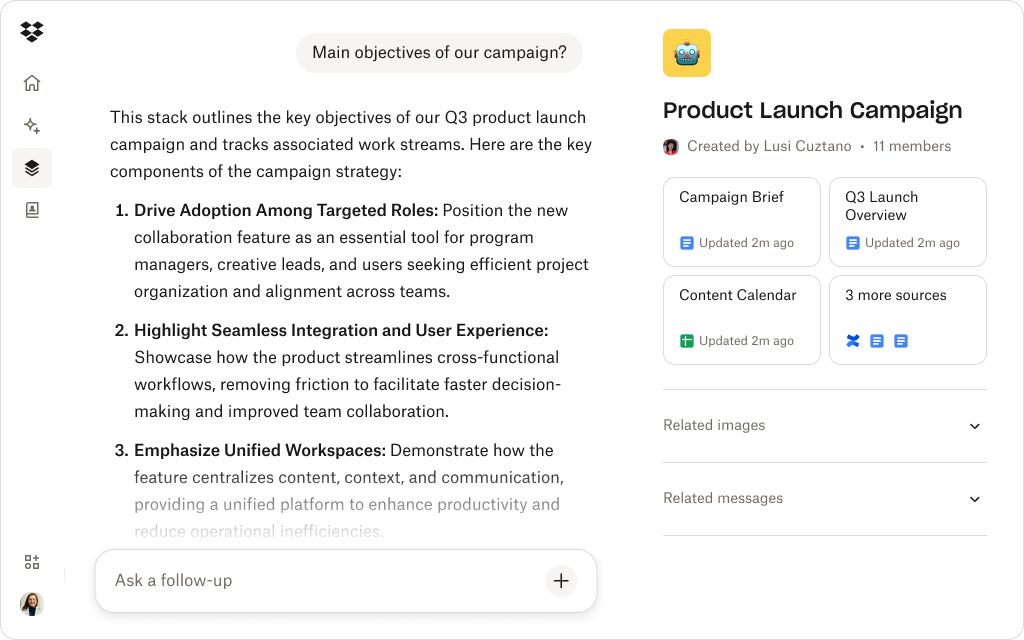
How Dash helps teams fix AI issues fast
When AI goes off track, the fix shouldn’t mean starting over. Dropbox Dash helps teams correct weak outputs quickly by grounding every AI response in your real, approved campaign content. The result: faster iteration, less cleanup, and work that stays true to your brand.
Dash Chat uses real files to guide AI outputs
Marketers don’t have to rewrite from scratch. Instead, they can direct Dash Chat to:
- Pull insights from past briefs
- Rewrite based on messaging frameworks
- Adjust tone using stored brand guidelines
- Summarize creative references
- Rebuild copy using theme-specific context
By anchoring AI in your Dropbox-stored files, Dash Chat keeps every iteration consistent with the strategy that’s already working.
Universal search retrieves the exact assets AI needs
If a strategist wants to refine a tagline using insights from last year’s launch, they can instantly surface that campaign deck or messaging doc with universal search then feed it into Dash Chat as context. AI now has everything it needs to respond accurately and on-brand.
Fixing AI results becomes iterative instead of overwhelming
With Dash, refinement happens step by step, not in one giant rewrite. Teams can guide AI just like they’d coach a junior copywriter:
- “More conversational.”
- “Less technical.”
- “Match the tone of this approved message.”
- “Use themes from the spring campaign.”
Because every adjustment is grounded in live Dropbox files, the output stays aligned and up to date with no outdated references and no lost versions.
Dash turns AI refinement into an extension of campaign development—not a cleanup job. It helps marketing teams fix issues early, keep messaging consistent, and turn every AI draft into a reliable starting point for great work.
See how Dash helps refine AI outputs using real campaign context
Dash Chat rewrites and improves content using your stored marketing files.
A repeatable workflow for correcting and improving AI results
Teams don’t need complex prompting formulas to get great AI results. They just need a clear, consistent process that mirrors how marketers already work. With Dropbox Dash, refinement becomes less about trial and error and more about building momentum.
1. Identify what’s wrong with the output
Instead of stopping at “this doesn’t work,” define why. Pinpointing the issue helps you give AI a clear direction forward:
- Tone mismatch
- Missing message clarity
- Incorrect audience framing
- Creative ideas that don’t align
- Structure that doesn’t fit the format
When you can name the problem, you can fix it faster.
2. Gather the right reference materials
AI works best when it’s fed with the right context. Use universal search to surface the most relevant materials instantly.
Pull in:
- Past campaign decks
- Brand voice guidelines
- Audience insights
- Approved copy examples
- Previous creative explorations
Context fuels clarity. The richer the source material, the stronger the AI output.
3. Ask Dash Chat to rewrite using those references
Once your context is in place, direct Dash Chat to rebuild the content around it. You might say:
- “Rewrite this using the tone from our winter campaign.”
- “Adjust this message to match the clarity in our youth audience brief.”
- “Pull themes from the sustainability refresh and apply them here.”
Because Dash Chat works from your Dropbox-stored content, every iteration reflects your real campaigns, voice, and goals.
4. Iterate in small loops
Don’t overhaul everything at once. Guide AI with focused feedback and quick cycles:
- “Shorter.”
- “More active voice.”
- “Try a bolder variation.”
- “Make it sound more premium.”
Each adjustment teaches AI what good looks like for your brand which produces sharper, more accurate drafts over time.
5. Save improved outputs for the next campaign
Every refined version, insight, and AI-generated variation can be saved in Dropbox for future reference. That way, your next campaign doesn’t start from scratch, it starts from what already works. This creates a growing foundation of institutional knowledge, helping teams move faster and maintain consistency across every project.
Keep your campaigns on track with smarter AI feedback
Bad AI outputs don’t derail campaigns when teams know how to correct them. With Dash, refining AI becomes a natural part of the creative workflow—supported by real files, real decisions, and real campaigns stored in Dropbox.
Dash gives teams a smarter way to guide AI, improving outputs early so creative momentum stays strong. Try a demo or contact sales today.
Frequently asked questions



.webp)