
.svg)

.svg)

Clearer feedback helps AI generate stronger, more useful work.
Most teams still treat AI like a vending machine: you type in a prompt, wait a few seconds, and take whatever comes out. But that approach leaves a lot of potential on the table. The best AI results don’t come from the first try, they come from a conversation.
AI learns from how you guide it. Every bit of feedback, about tone, structure, or intent, helps the system understand what “good” looks like for your team. The clearer and more intentional that guidance, the smarter and more aligned the output becomes.
Think of AI as a creative partner that gets better with direction. When teams know how to shape its responses—refining, clarifying, and building on what it produces—they unlock faster workflows and higher-quality work with every iteration.
Dropbox Dash helps teams build that feedback loop. By grounding AI responses in your own files and projects, Dash makes it easy to review, refine, and improve output all while keeping every version connected to the right context.

Why AI needs clearer human feedback
AI is fast but not intuitive. It can generate pages of content in seconds, yet it doesn’t truly understand nuance, emotion, or creative intent. That’s where people come in.
Without clear direction, even the best AI systems produce results that sound polished but feel slightly off. Maybe the tone isn’t quite right, or the message misses the emotional mark. Clear, human feedback bridges that gap.
When teams explain why something isn’t working, whether it’s pacing, tone, or the level of detail, AI can course-correct their output. Each round of feedback brings it closer to what you envisioned. Over time, that loop becomes a rhythm: faster iterations, stronger outcomes, and far less frustration.
AI isn’t at its best when it guesses what you want—it’s at its best when you tell it.
The challenges teams face when refining AI output
Refining AI output isn’t always straightforward. Even teams eager to experiment often get stuck in the same traps:
- Accepting the first draft instead of shaping it
- Offering feedback that’s too vague to guide improvement
- Stopping after one iteration instead of exploring stronger variations
- Working across disconnected tools that make collaboration clunky
- Lacking a defined process for reviewing and improving AI drafts
Without a structured feedback loop, AI starts to plateau—producing content that sounds repetitive or surface-level. And that’s not because it can’t do better. It’s because the workflow around it doesn’t give it a chance.
Dropbox Dash helps close that loop. By connecting prompts, drafts, and revisions in one shared workspace, teams can see exactly what’s changing and why, turning refinement into a collaborative process, not an afterthought.
What effective AI feedback should look like
Great AI feedback is clear, specific, and actionable. Instead of treating responses as finished products, treat them as first drafts with potential. The goal is to help AI learn what “good” means for your team.
Effective feedback might include:
- Highlighting what worked and why it’s valuable
- Pinpointing what needs to change and how
- Giving examples of the tone, format, or audience you’re aiming for
- Adjusting constraints like length, reading level, or style
- Asking for new variations instead of endless revisions
For example, instead of saying:
“Make this better.”
You might say:
“Shift this into a more conversational tone and include one real-world example for clarity.”
That level of precision transforms AI from a reactive tool into a proactive collaborator, one that learns your preferences, reflects your strategy, and delivers work that feels unmistakably yours.
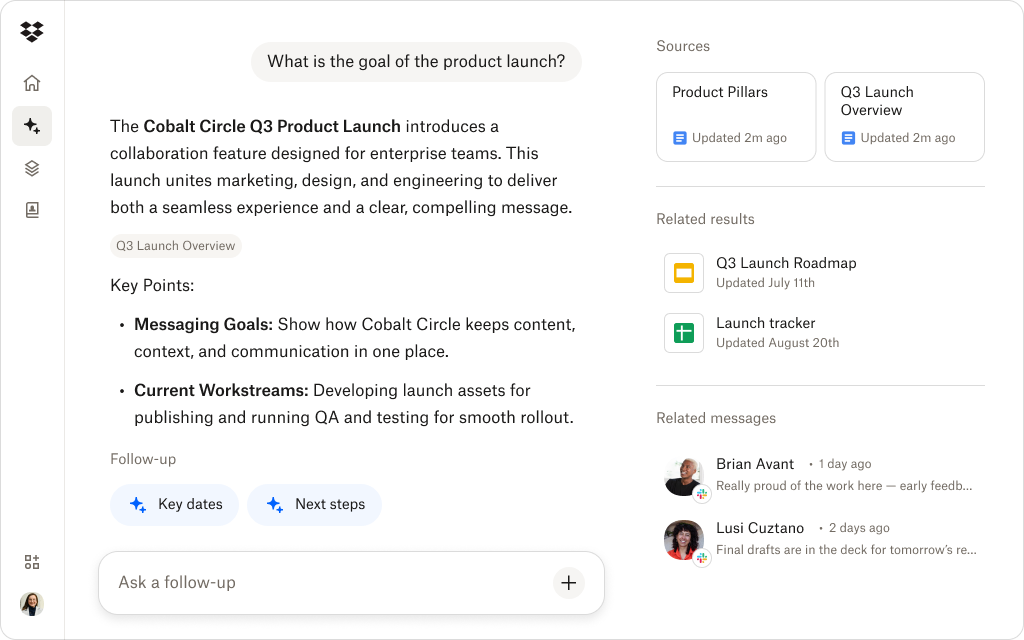
How Dash Chat helps create a stronger AI feedback loop
AI becomes more valuable when it learns alongside your team. Dropbox Dash brings that feedback loop right into the tools and files you already use, so refinement happens in context, not in isolation.
Refine drafts in real time
With Dash Chat, iteration is effortless. Teams can rewrite, expand, condense, or reframe AI-generated work as many times as needed without losing track of earlier versions. Each change becomes part of a visible evolution toward stronger, more aligned output.
Keep context connected
Because Dash is built across your Dropbox files and other connected apps, AI doesn’t work from a blank slate. It references your stored decks, briefs, and messaging docs to help teams create content that’s consistent with previous campaigns and brand standards.
Compare iterations in one place
Versioned files, threaded feedback, and AI outputs all live together. Teams can see how drafts progress, what feedback shaped them, and where final approvals land. That transparency keeps everyone aligned and every improvement traceable.
A workflow that mirrors how teams already work
Dash doesn’t ask you to learn a new system or migrate content. It simply layers AI refinement onto the workflows you already know so creative iteration feels faster, smoother, and more natural from day one.
See how Dash improves your AI workflows
Dash Chat makes refinement easier by keeping prompts, drafts, and content in one place.
A simple approach to refining AI results over time
Improving AI output doesn’t require new tools or long learning curves, it just takes consistency. Teams can build stronger, more reliable results by following a simple, repeatable feedback process:
- Start with a clear goal: Define what success looks like before generating anything, including tone, purpose, audience, or structure.
- Identify what needs adjustment: Call out the specific parts that feel misaligned. It might be the introduction, the voice, or the level of detail.
- Layer feedback gradually: Each round of refinement should build on the last. Adjust tone, then structure, then clarity, rather than everything at once.
- Test alternatives: Ask AI for multiple variations so you can compare and merge the strongest ideas.
- Capture what works: Document successful prompts and feedback patterns. Over time, these become playbooks your team can reuse and refine.
When you follow this loop, AI stops being just a draft generator and becomes a genuine creative partner that learns your preferences, understands your standards, and continuously improves with your team.
Bring better AI outputs into your workflows with Dropbox Dash
Teams get stronger AI results when they guide the work, not just accept it. Dash brings that refinement loop directly into your workspace, helping teams iterate quickly, stay aligned, and produce content that reflects real human intention.
By combining AI chat with your stored files, feedback, and context, Dash gives teams a more thoughtful way to collaborate with AI—without changing how they already work.
Try a demo or contact sales today.
Frequently asked questions


.webp)