
.svg)

.svg)

AI becomes more useful when you give it the right context up front.
Many teams expect AI to instantly understand their world—their brand voice, campaign goals, and creative intent. But without the right context, AI can’t deliver the depth or precision you need. It doesn’t know your priorities or the reasoning behind past decisions unless you show it.
When context is missing, AI fills in the gaps with guesswork. This leads to generic content, repeated corrections, and time lost to re-prompting instead of progressing. What should feel like acceleration ends up slowing you down.
The solution is simple but powerful: AI gets smarter when you teach it. The more relevant context you provide—files, briefs, messaging docs, data sources—the faster it can produce meaningful, trustworthy answers.
That’s where Dropbox Dash comes in. Dash connects your team’s content across files, folders, and apps, surfacing the most relevant materials before AI even starts working. Its responses are grounded in your organization’s actual knowledge, not the open internet, so every answer reflects the way your team really thinks, works, and creates.
With Dash, you’re not just using AI. You’re training it to think in context to speed up production.

Why context is the missing ingredient in AI
AI can organize information and generate ideas but it doesn’t have intuition that lets it know what makes your work yours. It doesn’t naturally understand your organization’s history, goals, or creative preferences.
It doesn’t know:
- What your most recent campaign emphasized
- How your team frames messaging
- What visual direction is approved
- Which audiences matter for this quarter
- What decisions were made last week in a planning doc
Without that context, even advanced AI tools can produce results that sound polished but feel disconnected from your strategy.
Take a simple example: a marketing manager asks AI to rewrite a campaign tagline. Without understanding the brand’s tone, message hierarchy, or past iterations, the output might be catchy but completely off-brand. The problem isn’t creativity, it’s the AI having lack of context. AI can’t align with your intent unless it understands the story behind your work.
The challenges teams face when AI tools lack context
When AI isn’t grounded in the right information, even the best teams end up in a frustrating loop. Instead of accelerating progress, AI adds rework due to:
- Re-prompting becomes the default: Teams ask AI to revise again and again because the outputs don’t reflect the work already done
- Generic responses slow progress: Ideas lack relevance to your audience, brand, or creative constraints
- Campaign knowledge becomes fragmented: Important details live in disconnected folders, emails, or chat threads that AI tools can’t see
- Creative and marketing teams repeat the same explanations: They must remind AI of tone, audience, or goals every time they start a new prompt
- Context switching steals focus: Team members waste time jumping between apps to collect files and reassemble the full picture before generating new work
AI doesn’t struggle because it’s incapable. It struggles because it cannot access what it needs and see what your team already knows.
What effective contextual AI should understand
A truly contextual AI system doesn’t just generate content—it understands your organization’s ecosystem. It connects dots, recalls past work, and builds on it intelligently.
Here’s what that looks like in action:
- Recognize relationships across content: When a designer searches for “Spring brand refresh direction,” AI should understand which strategy docs, creative concepts, and feedback rounds connect to that project
- Adapt to your brand’s tone and creative approach: A content strategist rewriting a landing page shouldn’t need to restate voice guidelines every time
- Draw from previous campaigns: Most marketing teams reuse structure, themes, or insights. AI should be able to surface those patterns
- Respond with clarity, not hallucination: Context reduces the risk of AI inventing information or misunderstanding your intent
- Incorporate human refinement: AI should be able to learn as you adjust prompts, iterate on drafts, and provide feedback
Context turns AI from a content generator into a creative collaborator. One that doesn’t just sound smart, but actually works the way your team works.
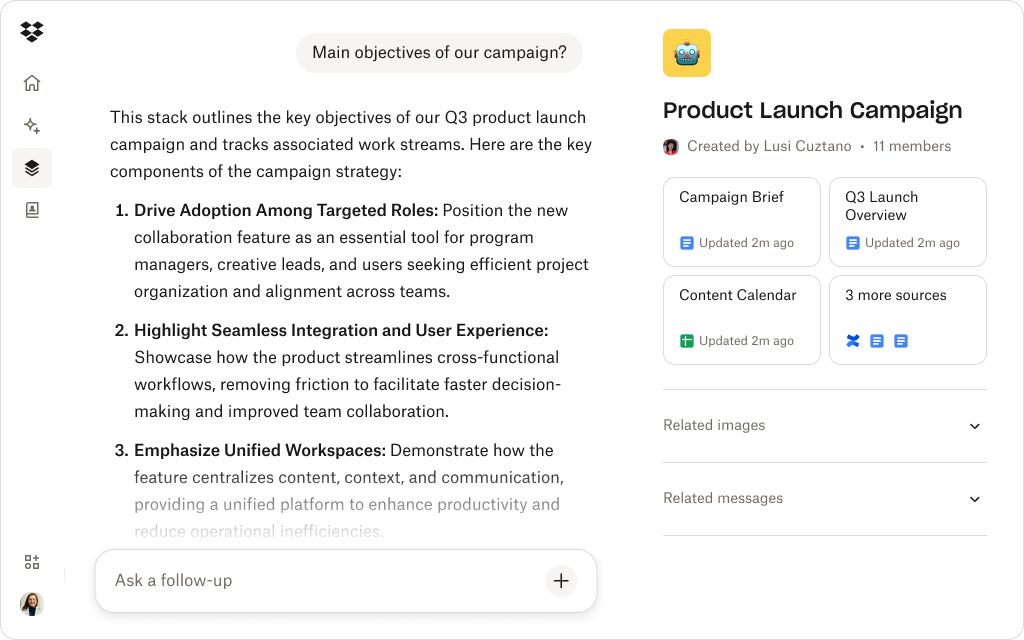
How Dash uses your connected content to create contextual answers
AI works best when it understands the full picture. Dropbox Dash brings your team’s real content to the center of every AI interaction—so it doesn’t guess, it references.
Universal search finds what matters first
Before AI generates a single word, Dash uses universal search to surface the most relevant files from your connected tools. A marketer searching for “Q2 messaging direction” might instantly pull up the campaign brief, persona notes, and early slide drafts all before they even start prompting.
Dash Chat uses your real content as context
Instead of relying on generic online data, Dash Chat draws directly from your organization’s materials, like past campaigns, product positioning, messaging docs, and internal notes, and connected apps. Every AI response reflects your actual strategy, not someone else’s.
AI explanations link back to source material
Every Dash answer comes with traceability. Teams can open the original files behind an AI-generated summary, giving creative leads and marketing managers confidence that every output aligns with approved content.
Context flows naturally into iteration
If the first answer needs refining, teams can adjust prompts, add more files, or direct Dash toward a specific source all within the same chat. Feedback becomes part of the workflow, not a reason to restart the work.
Dropbox-integrated structure creates consistency
Because Dash is built on top of Dropbox, it naturally understands your existing folder structure. It uses that organization to enhance context, helping AI stay accurate and brand-aligned.
For marketing and creative teams, this means you no longer have to explain your work to AI as Dash connects the dots automatically, turning your collective knowledge into an instant source of creative intelligence.
See how Dash delivers more contextual answers
Dash universal search connects your content and uses it to power richer, more accurate AI responses.
A practical workflow for giving AI richer context
Teaching AI context shouldn’t mean collecting files manually or rewriting prompts again and again. Dropbox Dash makes it effortless, turning what used to be a chore into a natural creative rhythm:
- Start with a clear question: Instead of a broad prompt like “Write campaign messaging,” define the outcome: “Write a product headline for a B2B campaign using our Q2 positioning.”
- Let Dash surface relevant materials: Use universal search to pull in campaign assets, research summaries, and creative explorations that give AI the full picture.
- Feed AI the right reference points: Point Dash Chat toward the docs that define your tone, goals, or constraints. The more relevant the source, the sharper the result.
- Refine in cycles: Ask AI to adjust tone, length, or structure. Each round of feedback teaches it more about your team’s style and standards.
- Compare variations and pull forward what works: Keep the strongest lines, merge creative directions, and evolve ideas collaboratively, all within your Dash workspace.
- Store everything in context: Because Dash is layered on Dropbox, every draft, reference, and decision stays connected to the files that informed them. Nothing gets lost, and your creative lineage remains crystal clear. Become even more organized with dedicated project Stacks to keep all files, feedback and approvals in one place.
This workflow mirrors how creative teams already operate, it just removes the friction, keeping everything connected, traceable, and ready for the next campaign.
Teach AI to work the way your team already thinks
AI becomes far more powerful when it understands the world your team operates in. With Dash, context isn’t a chore. It’s a natural extension of the work already happening in Dropbox.
Dash helps teams:
- Retrieve the best reference materials instantly
- Feed AI richer inputs without manual gathering
- Produce answers aligned with established messaging and creative direction
- Reduce rework by grounding AI in what’s already approved
When context is connected, answers arrive faster—and with far less iteration. Try a demo or contact sales today.
Frequently asked questions



.webp)