
.svg)

.svg)

What would your campaigns look like if everyone always worked from the same version?
Marketing work rarely fails because of a lack of ideas. More often, it gets stifled by something far less inspiring—not knowing which file is actually the right one. It’s a common issue, a deck called “final”, a second one called “final_v2,” and a third called “final_final_review”—and somehow none of them match what leadership last approved.
Version clarity is part of creative clarity—if no one’s sure which file to use, it’s hard for teams to stay focused on the work that actually moves campaigns forward. And, when busy marketing teams can’t tell which version is current, momentum disappears. This leads to problems like:
- People giving feedback on outdated assets
- Writers fixing old copy
- Teams prepping for reviews using slides that no longer reflect decisions
Overall, that means launches inch forward—instead of moving confidently toward the deadline. Over time, that chaos can erode trust in the process—and confidence in the work itself.
Dropbox Dash, built into Dropbox, helps teams regain confidence in file versions by making it easier to find, compare, and understand what appears most current—so campaigns can move forward, instead of circling back.

Why version confusion slows campaigns down
Version confusion doesn’t normally start as a big problem—it starts as a tiny mismatch. One file gets downloaded, another gets edited, and suddenly the team is building momentum on different versions of the same idea.
Version confusion creeps in anywhere multiple people collaborate at speed. It is especially painful in marketing and creative environments, where:
- Several stakeholders give feedback at different times
- Multiple formats exist (documents, decks, images, scripts, and so on)
- Work travels across channels, teams, and regions
When those moving parts aren’t clearly connected, the latest file version becomes a guess—and every handoff becomes a risk. For example:
- A campaign manager might think a deck is ready, only to discover a newer version in someone’s personal folder
- A copywriter might revise copy blocks that were already replaced two rounds ago
- A designer may export assets from an outdated file and not realize until late in production
The result is more than mild frustration. It leads to process issues like:
- Redundant edits
- Conflicting feedback
- Extra review cycles
- Confusion about what was already decided
This is all because the team cannot easily see which version should be the source of truth. The fix is clearer, shared visibility, so everyone builds on the same current and approved foundation.
That’s why teams need a way to see which version is most likely to be right—before they open, edit, or present it.
How file version control breaks in real teams
Version control sounds simple in theory—one file, one truth. In reality, teams move too fast, collaborate too broadly, and work across too many touchpoints for a single source of truth to hold on its own.
Here’s how it breaks down in practice:
- Parallel copies multiply quietly: Someone downloads a deck to present, makes edits offline, and uploads a “new” version. Another teammate duplicates a file to experiment with a different direction. Before long, three or four similar files exist in different locations—and progress in different directions.
- Naming conventions fall apart: “v1,” “v2,” and “v3” look neat at first. Then come “v3_client,” “v3_internal,” and “v3_FINAL.” Without a clear pattern, the names stop being reliable markers of status.
- Channels become unofficial storage: Important attachments often live in email threads or chat history, not just in shared folders. People pull those versions forward without realizing they’re outdated.
- New collaborators join midstream: Someone new joins the project, searches quickly, and grabs the first file that looks relevant. They don’t always know whether it’s current.
- Reviews happen on the wrong file: Stakeholders mark up an older deck because it is easier to find, leading to feedback that no longer applies.
Traditional file version control tools help with history inside a file, but don’t always prevent multiple “live” copies from floating around. The fix is shared visibility—a way to find the right version and keep the source obvious.
What good version visibility should look like
When everyone can see what’s current, approved, or changed, teams stay in flow, and campaigns keep moving instead of stalling in second-guessing. The goal is shared clarity in a connected workspace, which means pulling work and its context into one place (like a Stack in Dash)—so no one has to hunt for the real version.
Strong file version control for marketing teams is less about process checklists and more about clarity. It should be easy to:
- See which file is the latest approved version
- Understand how a file has changed over time
- Confirm whether the copy or design you are editing is still current
- Find the right campaign asset without sorting through every draft
- Give feedback, knowing you’re looking at the correct work
For example, a brand lead preparing for a go-to-market review should be able to open a single deck, confident it reflects all the latest copy, positioning, and design decisions—without manually comparing multiple versions.
That level of confidence is what keeps campaigns moving. And when the latest, approved files live with context together in a shareable Stack, alignment becomes the default—so the team spends less time asking which version is right and more time making the work better.
How Dash and Dropbox reduce version confusion together
Dash doesn’t magically guess which file your team should treat as the right one, but it does give you AI-powered features to find, organize, and verify the right version quickly—using Dropbox cloud storage as the foundation:
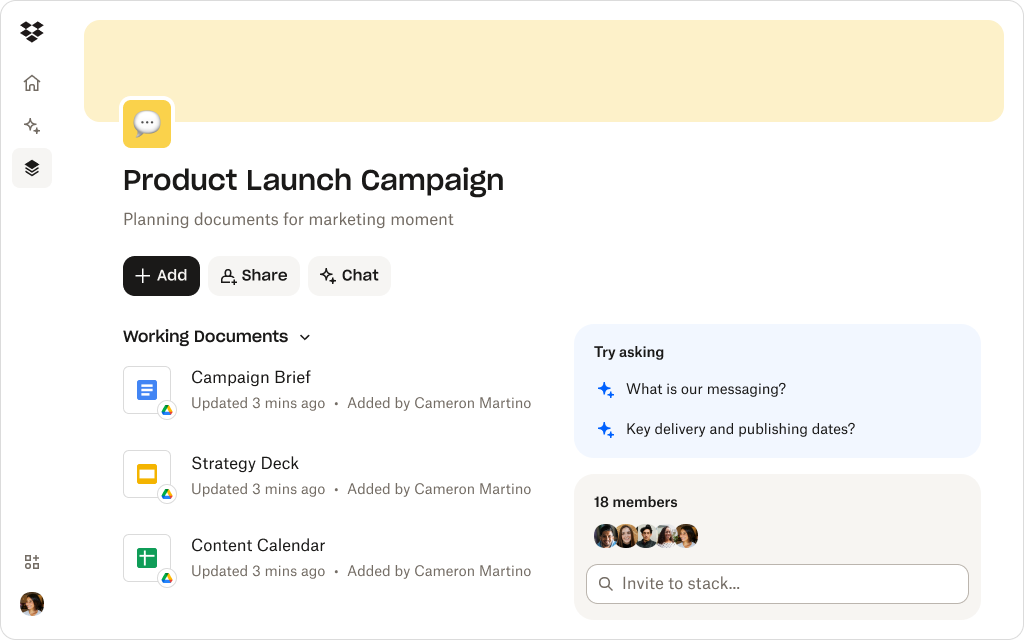
Stacks to gather the right version in one place
Once teams confirm the correct files, they can pull them into a Stack for the campaign:
- The approved messaging document
- The current version of the creative deck
- The latest asset exports
- Supporting research
From then on, teammates know to return to the Stack rather than dig through folders. Dash makes that Stack easy to find, share, and reuse.
Example: A launch lead shares a single “Launch-ready” Stack before the executive reviews—so everyone opens the same deck, uses the same copy, and reviews the same exports.
AI-powered search on top of Dropbox version history
Dropbox already maintains version history for files stored in shared folders. Dash builds on that by making it easier to locate the file you should be working with via universal search:
- When you search for a deck or document, Dash surfaces results with clear context like location and recency
- You can see which file lives in the shared project folder versus personal or legacy locations
- Dash Chat can summarize the contents of likely file candidates, so you can confirm which aligns with the latest direction
Instead of guessing based on filenames, universal search allows you to rely on content and structure.
Example: A copywriter searches “pricing one-pager” and immediately finds the version in the shared campaign folder—not the old attachment someone posted in Slack two weeks ago.
Dash Chat to compare and clarify
When multiple versions exist, Dash Chat can help you understand them. You can:
- Ask Dash to summarize two similar decks so you can spot the one that includes the latest changes—for example, the new pricing, updated messaging, or recent visuals
- Use AI-generated summaries to see which file references the newest campaign decisions or audiences
You remain in control, but AI does the heavy lifting of scanning and explaining.
Example: A brand lead asks Dash to compare two “final” decks before sign-off and instantly sees which one includes the approved positioning updates.
A workflow that respects existing controls
Dash security is built on the trusted Dropbox infrastructure, which means it won’t bypass existing permissions or version history in any connected apps. It reads from the same shared folders, link settings, and access rules your team already uses, helping ensure AI results and summaries are tied to the same files you trust.
Example: An agency partner can access only the approved delivery assets in Dropbox—while internal drafts remain private, and Dash won’t surface what they can’t open.
Helps teams work from the right files
Stacks in Dash let you organize your files into groups—making it easy to create a shared visibility of what’s current, what’s approved, and what changes as campaigns progress.
A practical workflow for finding and staying on the right version
To prevent campaigns from stalling due to version confusion, teams can combine Dropbox and Dash into a simple, repeatable flow. Dash can’t stop every duplicate from existing—but when teams follow a simple cloud storage, universal search, and Stack workflow, it becomes much easier for everyone to find and stick to the right version.
When teams adopt the workflow below, Dash becomes the easiest place to see what’s current:
1. Anchor work in shared folders
From the start of a campaign, keep key documents and decks in clearly named, shared Dropbox folders. This gives Dash a consistent structure to search across.
2. Use Dash universal search instead of manual browsing
When someone needs “the latest launch deck,” they can use universal search in Dash using natural language like:
- “Current product launch presentation”
- “Final deck with updated positioning”
Universal search surfaces candidates from the shared environment, making it easier to avoid stray copies.
3. Ask Dash Chat to verify
If multiple files look similar, a marketer can ask follow-up questions like:
- “Summarize the differences between these two decks”
- “Which of these documents includes the most recent positioning language?”
Dash Chat can then highlight meaningful distinctions—so teams can choose files with confidence.
4. Pull confirmed versions into a Stack
Once the team aligns on the right files, they can create or update a campaign Stack containing:
- The approved deck
- The current copy of a document
- Final image assets
- Any relevant notes or decisions
- A short summary (created in Dash Chat) to provide fast context
This means Stacks become the “front door” for ongoing work, and everything stays organized.
5. Use AI summaries during reviews
Before a review, teams can ask Dash Chat to recap what changed since the previous round. Reviewers then see the evolution directly connected to the ready-to-use files in Dropbox, reducing confusion and avoiding rework.
Over time, this approach prevents version drift and keeps teams returning to the same sources of truth.
Keep campaigns moving with confident version control
Version confusion is quiet but costly, causing campaigns to slow down and trust to erode. The solution is giving marketing teams tools that make the right version easier to find and confirm.
With Dropbox providing reliable file version history and shared folders, and Dash adding Stacks for easy project organization, marketers get the visibility they need to move forward confidently. Try a demo or contact sales today.
Frequently asked questions



.webp)