
.svg)

.svg)

Want to deliver polished, branded client portals—without adding another tool?
Agencies and in-house marketing teams know the pain of running a flawless project—but still losing momentum at the final delivery step. By the time your precious assets are approved, several problems can arise:
- File versions multiply, making it easy to lose track
- Links get buried in inboxes, making it difficult to find the right file version
- Clients end up asking, “Can you send everything again—in one place?”
Traditional delivery workflows rely on outdated methods like compressed folders, email attachments, or a patchwork of file-sharing links. They work, but they don’t feel polished. And they definitely don’t feel professional.
In Dropbox Dash—your connected AI workspace built on Dropbox—organization and sharing features like Stacks offer a better path. Stacks give teams a lightweight, client-ready portal—a clean workspace that inherits your existing Dropbox permissions, so every file and every delivery feels intentional.

Why client delivery often falters at the finish line
By the time work reaches the delivery stage, teams have already invested significant time, energy, and trust. That’s exactly why this phase feels high stakes—one misstep can undermine weeks (or months) of strategy and execution.
Delivery is where clients form their strongest impression of how organized and reliable your process is, where the pressure is highest—and the margin for error is smallest. It’s also where messy systems reveal themselves.
Common issues include:
- Sending the wrong version or missing a crucial supporting asset
- Deliverables being split across multiple emails or links
- Clients losing track of what’s final
- Teams duplicating files to clean things up
- No cohesive experience to present work professionally
The work itself may be strong. But scattered delivery can make even the best output feel unpolished. When teams move to a single, structured delivery space—handoffs become clearer and easier for clients to trust.
The hidden cost of ad-hoc file sending and scattered email chains
Email feels fast and convenient on the surface. But as projects get more complex, those quick fixes pile up.
What began as one attachment becomes a mass of replies, forward chains, and folder links—and no one is sure which message contains the final file or latest instructions.
Email chains and improvised folder links create friction, such as:
- Files get forwarded without context—leading to misunderstandings, misaligned expectations, and extra time spent re-explaining work
- Approvals or instructions get buried—causing missed details, rework, and confusion over what was actually agreed
- Clients download outdated versions—resulting in off-brand usage, embarrassing inconsistencies, or last-minute corrections
- Teams lose visibility into what clients viewed or accessed—making it harder to troubleshoot issues, answer questions, or prove what was delivered when
- Last-minute changes require resending everything—creating unnecessary stress, delays, and a perception that the process is disorganized
This slows sign-off, weakens the client experience, and puts strain on teams. Teams need to replace “please see attached” with a simple, curated workspace—one link where clients can see the right file version in context.
What teams really need from a client-ready portal
Clients don’t want another platform to learn—they want a place to see what’s done, final, and what happens next. For marketing teams, the challenge is to deliver clarity without creating more process overhead.
A partner-ready sharing tool should feel like a natural extension of the work itself. To do this, they should provide:
- A single, polished destination: No extra software, no login loops, just one link that clients can bookmark and return to whenever they need the latest work.
- Clear organization: This means files grouped by purpose—final assets, source files, instructions, usage rights, and so on. As a result, clients instantly understand where to look and what each file is for.
- Built-in context: Notes that explain what’s included and what the client needs to do next, turning a list of files into a guided experience instead of a guessing game.
- Secure, permissioned access: Clients see only what they should, with easy control for teams to adjust visibility as projects evolve.
- Easy maintenance: If a file changes, the portal link stays the same but always shows the latest version. No resending links or recreating folders every time there’s a revision.
Dash Stacks can handle all five of these needs without adding a separate client portal platform, giving teams a client-ready space that looks professional on the outside and stays effortless to manage behind the scenes.
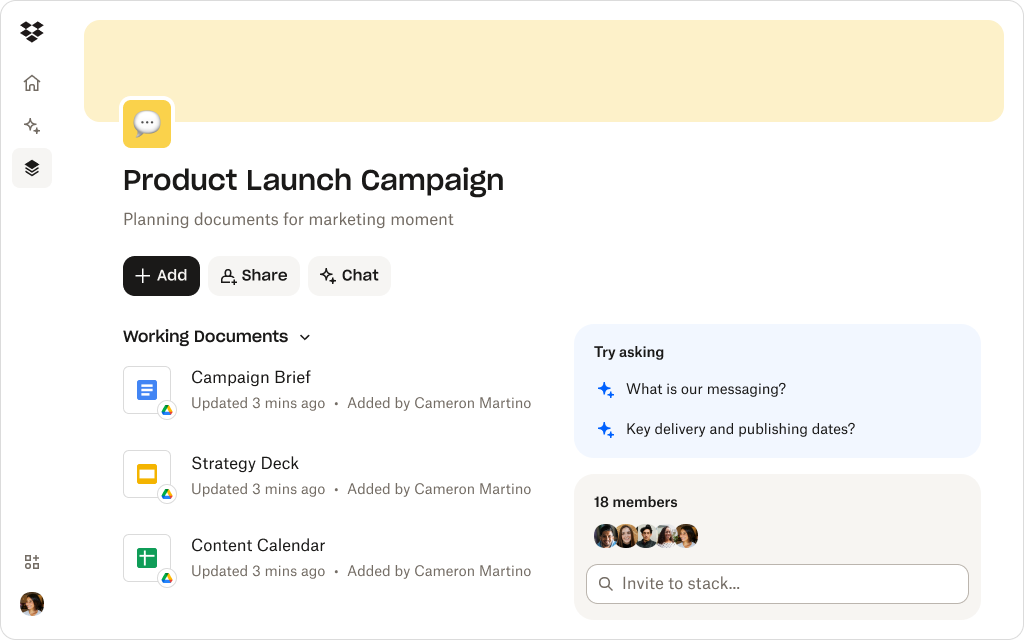
How Dash Stacks create clean delivery hubs
Instead of sending a mix of links, folders, and PDFs, teams need a simple, polished space that feels intentional and on-brand. Stacks turn folders into clean delivery hubs where assets, context, and permissions all work together.
Here are a few ways Stacks can give teams a client-ready experience—without requiring a client portal platform:
- Organize deliverables visually: Stacks let you present files in a clean, visual layout—perfect for those dizzying handoff moments with lots of files. Clients can scan everything at a glance instead of digging through folders.
- Share work with one simple link: Replace confusing email chains with a single destination for everything. One link becomes the home for all deliverables—no matter how often files get updated or revised.
- Add guidance and notes: Context labels in your Stack can help clients understand versions, usage, next steps, or approval stages. That way, there’s less “What is this?” and more “Got it, ready to go” on the client side.
- Keep permissions under control: Stacks use Dropbox permissions, so sensitive or pre-launch content stays protected. You maintain the same level of security and governance you already have—without any extra setup.
- Let teams provide context with AI-powered answers: Your team can get summaries and answers to questions about files via Dash Chat. This makes it easy to help partners understand files, recap decisions, or extract key takeaways—without overwhelming them or adding extra clarification calls.
- No tool bloat required: Clients don’t need to download extra tools or do extensive onboarding. They just open the link. The experience feels lightweight for them and low-maintenance for you.
Stacks bring simplicity and professionalism to the final step of delivery—turning the file sprawl that your hard work generates into a branded, easy-to-navigate hub that makes your work look as organized as it is strategic.
Help teams deliver organized, client-ready portals
Stacks turn scattered assets into clean, shareable workspaces—so clients always know where to find the latest version.
Practical ways agencies and teams use Stacks for delivery
Instead of stitching together links, folders, and email explanations, you can point clients and stakeholders to one organized, self-explanatory space. Practical ways agencies and teams can use Stacks for delivery include:
- Final asset handoff—group exported files, brand guidelines, and usage notes in one place, so clients know exactly what to use, where, and how
- Multi-phase campaign delivery—show progress clearly by organizing feedback rounds, revision cycles, and final approvals, giving clients a transparent view of how the work evolved
- Client onboarding kits—provide background materials, timelines, and discovery documents as a single link of grouped content, making it easy for new clients to get up to speed without digging
- Vendor or partner collaboration—share the right materials without revealing your entire folder structure, keeping external access tightly focused and secure
- Internal approval hubs—use Stacks for executive or stakeholder reviews before your client ever sees the work, so feedback and sign-off stay organized in one place
Stacks adapt to every workflow—no complex setup required. By layering structure and context on top of existing files, Dash Stacks turn delivery into a predictable, repeatable part of your process.
Turn delivery clutter into simple client portals with Dropbox Dash
Clients notice when delivery feels seamless. They also notice when it doesn’t. Stacks help teams deliver work with confidence by turning loose files into organized hubs that feel thoughtful and complete.
Combined with the secure foundation of Dropbox storage, you get a delivery workflow that is both polished and practical. Keep your work polished and your process painless—try a Dash demo or contact sales to find out more.
Frequently asked questions


.webp)