
.svg)

.svg)

Agencies need tools clients can use instantly—no onboarding, no new software.
Client work moves fast. New concepts, updated assets, last-minute feedback, shifting timelines. Agencies juggle a lot. But the biggest slowdown often comes from a simple friction point—clients don’t want to learn new software just so they can collaborate with you.
Heavy project management tools typically create more delays than they do clarity. Clients miss notifications, lose access, or simply opt out because the system feels too complicated. Agencies then often end up sending long email threads or scattered file links, instead of working in one place.
That’s why many agencies are adopting lightweight collaboration tools that offer simple, secure ways to share work, collect feedback, and keep projects organized—without onboarding clients into a brand-new platform.
Here we’ll look at a few lightweight collaboration tools that will encourage working together, as well as how Dropbox Dash makes this process even easier.

Why agencies need lightweight collaboration tools
Agencies thrive on collaboration, but project management tools can often slow teams down with steep learning curves, endless logins, or tangled communication threads. They can also often introduce friction, such as:
- Clients start avoiding new software altogether
- Partners work across their own systems, not shared ones
- Approvals tend to get lost in multiple threads
- Too many tools, which creates confusion (not alignment), and turns your agency into tech support instead of creative support
When collaboration tools get complicated, creativity and client service suffer. Luckily, lightweight solutions help agencies stay nimble by creating a single space for everyone to stay aligned.
The right tools help teams spend more time creating the kind of work that actually moves the needle.
The problem with heavy, all-in-one client portals
All-in-one platforms promise structure, but they also demand commitment.
Clients need to create accounts, complete onboarding, learn a new interface, and adjust to features they’ll rarely use. For agencies serving multiple clients with different levels of technical comfort—this becomes unsustainable.
Heavy systems tend to create:
- Delayed feedback cycles—reviews stall because clients put off logging into tools they don’t remember how to use
- Extra clarification emails—teams end up explaining where to click instead of discussing the actual work
- Confusion about where to find the right file—multiple links and locations make it unclear which version to trust
- Parallel shadow workflows in email or chat—despite the new tool, feedback still happens in email, Slack, or ad-hoc threads
A lightweight collaboration tool avoids all of this by staying intuitive and accessible from day one.
Instead of asking clients and partners to learn yet another system, it naturally fits into how they already work—so there’s less time spent managing tools and more time actually reviewing work and moving projects forward.
What to look for in a simple project collaboration tool
When you’re managing multiple workstreams, your tools should quietly remove complexity. The best collaboration solutions for agencies are built around clarity and ease of use. Here’s what to prioritize when choosing one:
1. Client-friendly
Collaboration should feel effortless for clients. Look for tools that let them open links, view assets, or leave notes without needing to learn new software. The goal is to make their experience as smooth as possible so your team can spend less time troubleshooting access issues and more time moving projects forward.
2. Secure
Security should be built-in because agencies handle sensitive, pre-launch materials like campaigns, product sheets, and other assets. A reliable tool should offer granular permission controls, link expiration dates, and password protection, ensuring only the right people can view or edit files.
3. Flexible
Every client relationship is different, so your collaboration tool should fit your workflow, not force you to change it. Choose one that integrates easily with your existing tools, like email, Slack, Adobe, or project trackers—and works across file types. This flexibility ensures your process stays consistent—even as projects evolve.
4. Organized
A shared folder full of disconnected files isn’t useful for collaboration. The right solution keeps everything connected—assets, notes, approvals, and context. Organized workspaces make it easy for teams and clients to see what’s complete, what’s in review, and what needs action.
5. Contextual
Clients don’t just need files. They also need to understand the context surrounding them. A good tool provides context for what they’re reviewing, whether that’s version history, visual previews, or explanatory notes. This eliminates back-and-forth questions and helps clients give more actionable feedback.
Here’s a quick checklist to make sure you’ve got all the right elements together in a prospective tool:
- Client-friendly access
- Secure sharing
- Flexible integrations
- Organized layouts
- Built-in context, which shows what each file means to the project
6 lightweight collaboration tools for agencies
Here we’ll unpack a few tools teams can use to more effectively manage the creative process in one place—while giving clients a clear, professional view of progress:
1. Dropbox Dash
Dropbox Dash is your connected workspace that brings files, context, and AI together in one place. Within Dash, Stacks check all the boxes from the above list and are a feature in Dash that gives agencies a fast, client-friendly workspace.
Organize your files in a Stack, share one link, and clients can view files and read the notes your team has added to explain what’s inside—without needing to learn a new tool. Behind the scenes, your team can use Dash Chat to summarize documents and keep that context up to date.
Marketing agencies use Stacks and other features in Dash to get the benefits of:
- Zero onboarding for clients
- Sharing everything for a project in a single view
- Answer features in Dash Chat, which help clients understand decks, briefs, and revisions
- Easy integration with files already stored in Dropbox
- Secure, permission-controlled sharing
Stacks turn every project into a simple, self-explanatory workspace—so agencies can share everything with one link. Clients don’t need to wade through folders or learn a new platform to understand what’s going on.
2. Dropbox folders and shared links
Still one of the simplest collaboration tools available. Clients can access files directly with a shared link, download assets, and leave comments when needed—all from their familiar Dropbox cloud storage.
This solution is best for:
- Straightforward file handoff
- Large asset deliveries
- Clients who want minimal process friction
For agencies, this is often the fastest way to hand off assets—no training, no complex navigation, just a clean download experience.
Agencies can pair this with Dash to add more context. In practice, it gives clients exactly what they need with nearly zero onboarding—so work moves forward instead of getting stuck in another platform.
3. Google Drive folders
Another familiar option for many clients, especially when collaborating on live documents, Google Drive is best for:
- Real-time copy or spreadsheet reviews
- Cross-functional partner work
- Clients already using Google Workspace
Potential limitations include:
- Feedback and approvals can still get scattered
- Hard to maintain structure across multiple clients
Used thoughtfully, Drive offers a low-friction way to co-edit live content—especially when paired with a more organized system for final assets and approvals. Google Drive is a basic collaboration tool without the speed and reliability of Dropbox—see how the two compare.
4. Slack shared channels
Great for real-time collaboration with clients who already use Slack. Strengths of collaborating this way include:
- Ability to ask questions fast and make quick decisions
- Easy to pass on small files or previews
- Reduction of email clutter
Although convenient, remember one important caveat—Slack is not ideal for organizing final assets or tracking version history. Slack shared channels shine as the conversational layer of client work, especially when decisions and deliverables are captured and stored in a more structured system like Dropbox or Dash.
5. Frame.io (for video-heavy agencies)
Frame.io is purpose-built for video production teams, with secure sharing and timestamped feedback. It’s best for:
- Video review cycles
- Creative agencies with heavy motion workflows
One note for Frame.io—it is not a full collaboration workspace, but a lightweight layer for video projects. For post-production teams, it shortens the review loop—making it clear what to change, without endless email threads. Frame.io is a slower, less reliable tool compared to Dropbox Replay—learn more about how they compare.
6. Dropbox Replay
Replay is dedicated review and approval layer for video, giving agencies and in-house teams a simple way to collect precise feedback without pulling their media from Dropbox.
Clients can watch, comment, and approve directly in the browser—no heavy portal required. It’s best for:
- Video and motion design reviews
- Multi-stakeholder approvals on edits and cuts
- Teams already storing media in Dropbox who want a smoother review cycle
With frame-accurate, time-stamped comments, version-aware review, and secure sharing that respects existing Dropbox permissions, Replay keeps every edit, note, and approval aligned to the right file.
Paired with Dash for context and organization, Dropbox Replay becomes a powerful yet lightweight way to manage video collaboration from first cut to final delivery—all in one convenient location.
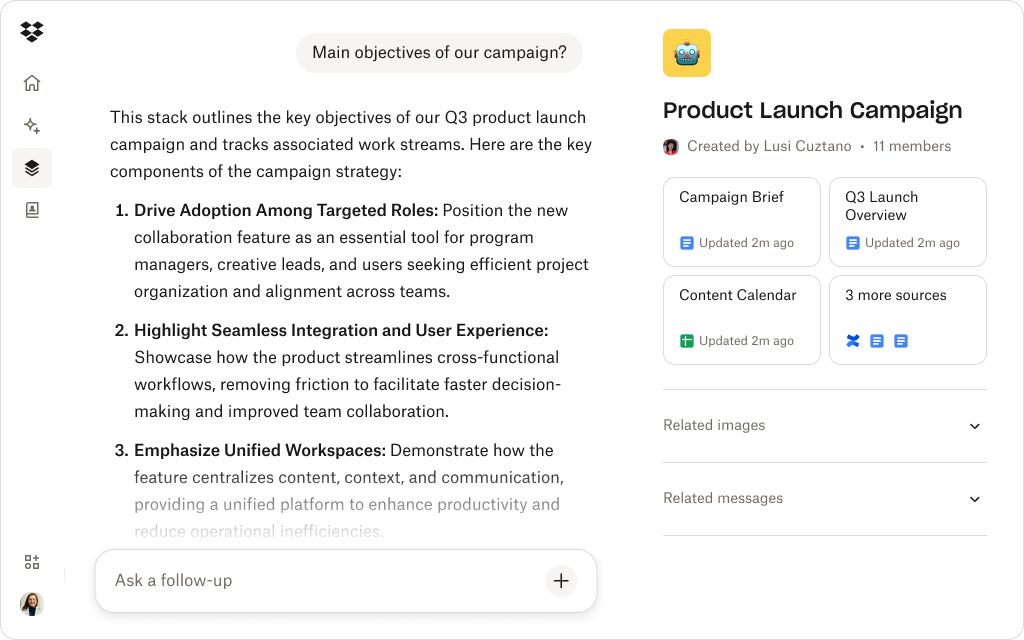
How Dropbox Dash creates a frictionless shared workspace
Dash has many AI-powered features designed to bring clarity to client collaboration by keeping everything discoverable, contextual, and accessible. By using Dash, teams can easily:
- Share one link for the entire project—Stacks let agencies group briefs, concepts, deliverables, and notes in a single place, with no folders to navigate or new tools to learn
- Context without the onboarding—your team can use Dash Chat to summarize documents or clarify the purpose of a file, so clients see the most important points without long email explanations or walkthroughs
- Secure enough for pre-launch content—Dash security respects all Dropbox permissions and adds centralized oversight through the admin console and protect and control settings
- No workflow disruption—Agencies don’t need to migrate anything, Dash works with the systems many teams already use, and it’s a solution for working with a wide range of industries
Clients work faster when tools get out of the way. Dash takes that concept further by adding clarity and context on top of a secure file foundation, so agencies can share everything clients need in one link—no confusion, no delays.
Unlock a smart way to collaborate with clients
Stacks let agencies share project materials in one organized link—so clients get clarity, and teams get fewer questions.
Choosing the right lightweight tools for your workflows
For most agencies and marketing teams, the sweet spot is a lightweight tool that feels familiar, requires almost no onboarding, and still keeps work organized, secure, and easy to review.
The goal is to spend less time explaining tools and more time moving projects forward. To pick a solution, ask:
- Does it reduce or increase client effort?
- Does it require extensive onboarding or annoying account creation?
- Can it centralize assets and context in one place?
- Does it respect existing file permissions?
- Can clients understand work quickly without help?
Dash offers all of this by blending secure Dropbox storage with a modern workspace built for collaboration and clarity. It lets you keep your tools lightweight and familiar for clients, while giving your team powerful new features.
Streamline client collaboration with Dropbox Dash
Collaboration is different for every client—but that doesn’t mean it can’t feel effortless. Lightweight collaboration tools like Dash help agencies move quickly, keep projects aligned, and share content without adding friction.
Dash helps agencies centralize assets, context, and communication—so every project becomes easier to follow and faster to complete. Try a demo or contact sales to get started.
Frequently asked questions



.webp)