
.svg)

.svg)

What if your best work never went to waste—but became the starting point for new ideas?
Marketers rarely intend to start campaigns from scratch—but it happens all the time. A new brief comes in, and suddenly the team is rewriting copy that already existed, redesigning visuals that were approved last year, or rebuilding insights that once lived in a now forgotten deck. The work isn’t new, it’s simply buried.
Marketing teams move fast, people change roles, folder structures evolve, and—without a clear way to surface what already exists—marketers fall back on the easiest path, simply creating everything again. In practice, this means:
- Campaigns don’t iterate from past creative work
- Unnecessary rework quietly slows launches and dilutes creative energy
- Your strongest ideas get harder to see in disconnected tools
- You’re not using the learnings from what’s already proven to perform
Dropbox Dash helps break that cycle by making past work easier to find and reuse. With AI-powered features to help turn past work stored in your cloud storage into discoverable, connected, and ready-to-repurpose materials, teams can start from strength—not from scratch.
.jpg)
Why teams keep rebuilding campaigns
Repetition happens quietly, and teams usually rebuild because old work is hard to retrieve. By the time a new launch rolls around, the original brief and the best variations are out of sight, and the “why” behind decisions is long forgotten.
That’s when a familiar pattern kicks in—starting over feels faster than stitching the past back together, even if it means repeating work, because the materials that made it successful are scattered across tools and time. Here’s why it happens:
- Work gets siloed inside projects: Campaigns often have dozens of digital artifacts—briefs, visuals, messaging explorations, performance takeaways. Once a project wraps, those artifacts disappear into folders that no one revisits. Without a way to surface them later, teams work twice—once to create, and again to recreate.
- Naming conventions are inconsistent: What was “Fall Launch Deck” one year becomes “Seasonal Prep Slides” the next. Neither name helps someone searching for reusable ideas. When search depends on guesswork, or you have no idea where to start, even your best assets become effectively invisible.
- People rotate roles or join at different times: Institutional memory is fragile. When someone who led a campaign moves teams, their knowledge goes with them. Without captured context, every new owner has to rebuild understanding before they can start building the next campaign.
- Creative explorations never reach the spotlight: Some of the best ideas live in early drafts or brainstorm notes that get buried once a final direction is chosen. Those unused (more like wasted) explorations are often where your most reusable hooks, headlines, and angles are hiding.
- Teams choose speed over search: When deadlines loom, it feels faster to rebuild than to hunt for old materials. But that little shortcut becomes a pattern—and patterns are what quietly inflate campaign timelines and dilute consistency over time.
These patterns are solvable—you just have to make past campaigns easy to find and understand, so reuse becomes the default and rebuilding from scratch stays the exception. Tools that surface the right materials fast and keep context intact can do just that—but is starting from scratch really that bad?
The hidden cost of starting from scratch
Starting fresh can feel productive and exciting in the moment—but over time, it quietly becomes one of the most expensive habits in marketing.
Rebuilding campaigns drains energy and slows momentum, especially for creative teams who thrive on iteration rather than reinvention. Here are a few impacts that it can have over the long term:
- It pulls attention away from strategy—instead of exploring new angles or refining messaging, teams spend time reestablishing context they already created
- It erodes brand consistency—when past assets aren’t reused, campaign voice, visuals, and themes drift from campaign to campaign
- It stretches bandwidth—writers create messaging frameworks again, designers rebuild core visuals, and strategists re-establish insights, when all of it could have been repurposed
- It creates unnecessary misalignment—teams who don’t reference past work may unintentionally contradict messaging, branding, or previous campaign decisions
The worst part is how quickly it compounds—one rebuild turns into a pattern, and that pattern becomes the default way campaigns get made. Marketers need a smarter way to rediscover work, a connected workspace—like Dash.
How Dash helps teams repurpose campaign materials
Dash connects your apps, past campaign content, and company documentation into a searchable, contextual, ready-to-reuse foundation.
Here are a few ways Dash helps marketing teams during campaigns and maximizes reuse:
Universal search retrieves content by meaning—not filenames
Marketers can use universal search to find concepts like “youth messaging”, “fitness themes”, or “holiday visuals”, and Dash surfaces relevant decks, copy files, brainstorm notes, and assets—even when naming is inconsistent. That means you search the way you remember the work, and Dash can pull the files that move the project forward.
Example: A social lead building a back-to-school push searches “youth messaging” and immediately finds last year’s best-performing captions, the approved tone notes, and the final creative deck—ready to adapt in minutes.
Stacks organize reusable materials effortlessly
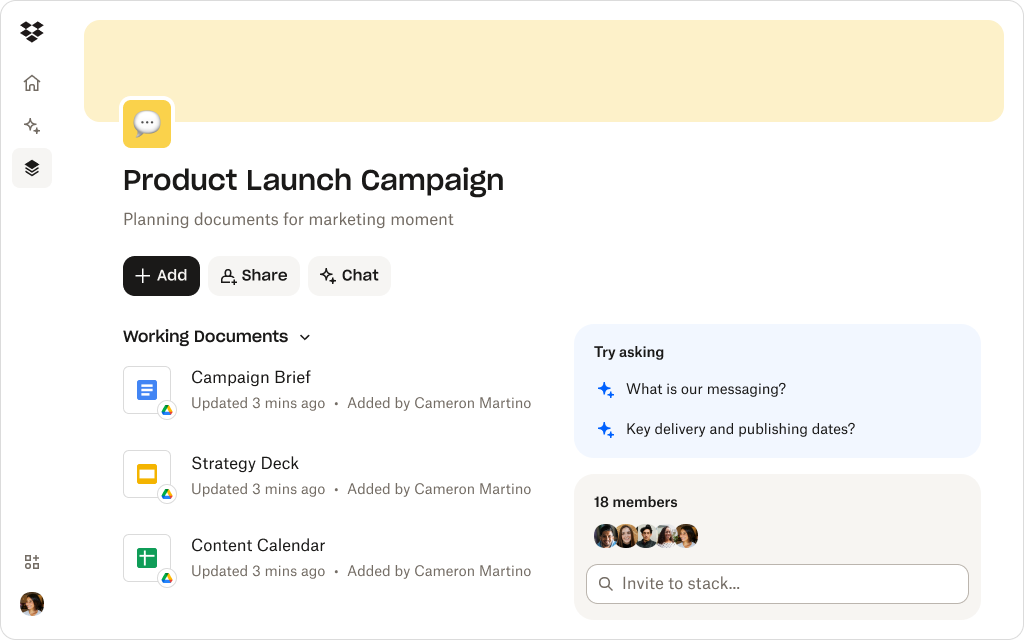
Stacks allow you to group all related content—briefs, visuals, messaging frameworks, research, concepts, anything you need—into lightweight workspaces that stay easy to scan and even easier to share. Instead of a messy archive, you get a clean, reusable campaign toolkit, which the whole team can work from.
Example: A campaign manager can build a “Product Launch Campaign” Stack containing:
- Last year’s copy variations
- Winning creative explorations
- Audience insights
- Approved messaging
- Past design treatments
Everyone can reference it—without digging through folders or guessing what’s current.
Dash Chat connects decisions to content
Team members can use Dash Chat to summarize files and even ask questions about their data as a whole, such as:
- “What angles did we emphasize last spring?”
- “What tone did we use for the high earner audience?”
Dash answers using real files, so new contributors understand the rationale behind old campaigns—without relying on memory or secondhand summaries. You get clarity and proof, with the sources right there when it’s time to act.
Example: A new copywriter joins mid-sprint, asks “What tone did we use for the high earner audience?”, and gets a grounded recap plus links to the exact briefs and approved copy—so their first draft sounds aligned on day one.
Everything stays anchored to Dropbox
No migrating content or rebuilding folders. Dash sits on top of your existing cloud storage structure, it just makes it more usable—without breaking what already works.
Example: A team keeps working in the same Dropbox folders they’ve always used, but now they can find and reuse past campaign materials across the workspace—without renaming, reorganizing, or changing how they collaborate.
Make campaign assets easy to reuse
Dash Stacks help teams assemble reusable collections of campaign materials grouped by theme, launch, or audience—for simpler reuse and greater visibility.
5 ways to stop rebuilding the same campaign
Dash makes repurposing past work simple, but teams also benefit from a behavioral shift in how they approach campaign development. Here are five ways to help teams avoid starting from zero:
1. Begin every campaign by searching concepts—not folders
Instead of remembering where something lives, marketers can search Dash for ideas like “spring messaging”, “wellness concepts”, or “previous product launch angle”. Universal search retrieves past assets tied to those ideas—briefs, decks, scripts, visuals, and more—giving the team a head start.
Starting with an initial search means the team always starts from a proven baseline—not a blank page.
2. Revisit unused creative explorations
Great ideas often never leave early drafts. Designers or writers may explore dozens of routes, but only one makes the final campaign. Those unused ideas become inspiration for future campaigns—if teams can find them.
Dash makes it easy to resurface:
- Exploratory visuals
- Copy variations
- Unchosen directions
- Early brainstorm notes
These become fertile ground for building new concepts on top of old ones.
3. Build a Stack for each major campaign theme or product
Instead of building a new folder every time, teams can use Stacks to organize the most relevant assets across the year. For a recurring seasonal launch, a Stack can contain:
- Past headlines
- Photo selects
- Motion concept options
- Priority audiences
- Insights that shaped the message
- Approved design elements
Stacks can evolve as the brand evolves, creating a living archive where teams can reuse—instead of rebuilding.
4. Use AI to summarize past campaigns before planning new ones
Dash Chat summaries turn long decks, scattered notes, and old briefs into clear summaries. A strategist can ask for a summary, and even add follow-up questions—such as:
- “What messaging worked in our wellness campaigns?”
- “What themes did we explore last summer?”
- “What insights shaped our brand refresh?”
This gives the entire team a shared understanding before brainstorming even begins.
5. Capture new learnings so future teams can build off them
Campaigns generate insights—what did or didn’t resonate, what audiences cared about, and so on. But unless teams intentionally store these learnings, they disappear. The smart mix of Dash features encourages teams to:
- Add new notes to Stacks
- Store updated decks in predictable folders
- Share links to approved assets
- Use summaries to highlight why decisions were made
After each campaign retrospective, try adding a short summary note to the campaign Stack—so the next person can see it just as easily and get the full context in minutes.
By keeping these tips in mind when using Dash, every campaign becomes a building block for the next.
Build momentum instead of repeating work
Marketing teams move faster and think more creatively when they stop rebuilding past campaigns. With Dash, repurposing becomes intuitive—past work is visible, searchable, organizable, and ready to inspire fresh ideas.
Dash turns your stored content into a connected intelligence layer, helping marketers evolve—not restart—their best work. Try a demo or contact sales today to find out more.
Frequently asked questions



.webp)