
.svg)

.svg)

Fast isn’t always right—here’s why AI one-pagers often miss what matters.
Every marketer knows the pressure: you need a polished one-pager—fast. It’s tempting to drop a quick prompt into your favorite AI tool, get a clean layout back, and move on.
But the problem shows up the moment you read it. The tone feels off. The product details are wrong—or worse, made up. It looks sharp, but it doesn’t sound like you.
That’s the AI one-pager pitfall: speed without substance.
The missing ingredient isn’t effort—it’s context. Most AI tools can write quickly, but they don’t understand your brand, your audience, or the “why” behind your message. Without that foundation, even the best model delivers something that feels generic instead of genuine.
What if AI could actually understand your work—pulling from your real files, brand guidelines, and campaign history—to write something accurate, credible, and unmistakably on-brand? That’s the promise of connected AI workspaces.

Why AI-generated one-pagers fail (and what they’re missing)
Most AI tools are great at writing quickly—but not at writing accurately. They’re designed to generate content, not strategy. And without access to your team’s internal context, even the most advanced model can only guess.
That’s why so many AI-generated one-pagers feel off. They sound polished but lack the details, tone, and hierarchy that make a message credible and on-brand.
Here’s what typically goes wrong:
- Missing context—AI doesn’t know your roadmap, product specifics, or campaign history
- Generic tone—it mimics marketing language but misses your unique voice
- Shallow structure—it can summarize but not prioritize, leaving ideas jumbled
- Made-up facts—when data is missing, the model fills in the gaps—with fiction
- Fragmented workflow—none of your real files—briefs, decks, or brand docs—are connected, so the AI never sees the full picture
On a deliverable as public and high-stakes as a one-pager, even small mistakes stand out. And what looks like a fast win can quickly become a credibility risk.
How missing context leads to inaccurate, shallow drafts
The real problem isn’t necessarily AI’s writing ability—it’s what it doesn’t know. AI can only work with what it’s given, and in most organizations, that context is scattered across tools: Dropbox folders, Slack threads, decks, and briefs that never quite live in the same place.
Without that connected knowledge, AI is forced to guess. If you ask a public model to “write a one-pager for our new campaign,” it doesn’t know:
- What goals or audiences define that campaign
- Which tone or positioning your brand uses
- What assets or proof points already exist
So it produces something safe and generic—language that sounds right but says little. The model isn’t being lazy; it’s being limited. AI isn’t missing creativity—it’s missing context. That’s what separates “good enough” from “on brand.” And that’s where Dropbox Dash changes everything.
What teams actually need from AI to create one-pagers that work
Creating a one-pager that actually works takes more than polished copy and a clean layout—it takes context. Teams want AI that doesn’t just generate words, but understands the work behind them: the data, the decisions, and the intent.
For AI to create high-quality, credible one-pagers, it needs three things:
- Accurate context: Access to real company information—briefs, decks, and campaign materials.
- Connected structure: Awareness of how documents, assets, and notes relate across tools.
- Clear creative intent: Guidance on tone, audience, and goals based on past work.
Generic AI tools can’t provide that. Dash can.
Because Dash understands the context around your work—what it’s about, who it’s for, and how it fits into the bigger picture—it helps teams move from blank page to ready-to-share faster. The result: content that feels confident, not canned.
Create one-pagers that get it right with Dropbox Dash
Dash connects AI directly to your team’s content—so every draft is informed, accurate, and on-brand.
How Dropbox Dash gets AI one-pagers right
Dropbox Dash doesn’t replace creativity—it gives it a foundation. By connecting AI directly to your company’s real content, Dash ensures every draft is accurate, consistent, and grounded in context.
Grounded in real data
Dash connects to Dropbox, Google Drive, Slack, and other tools, allowing its AI to pull from approved campaign briefs, brand decks, and messaging docs. The result: AI-generated one-pagers that reflect what your team actually said and built.
Built for collaboration
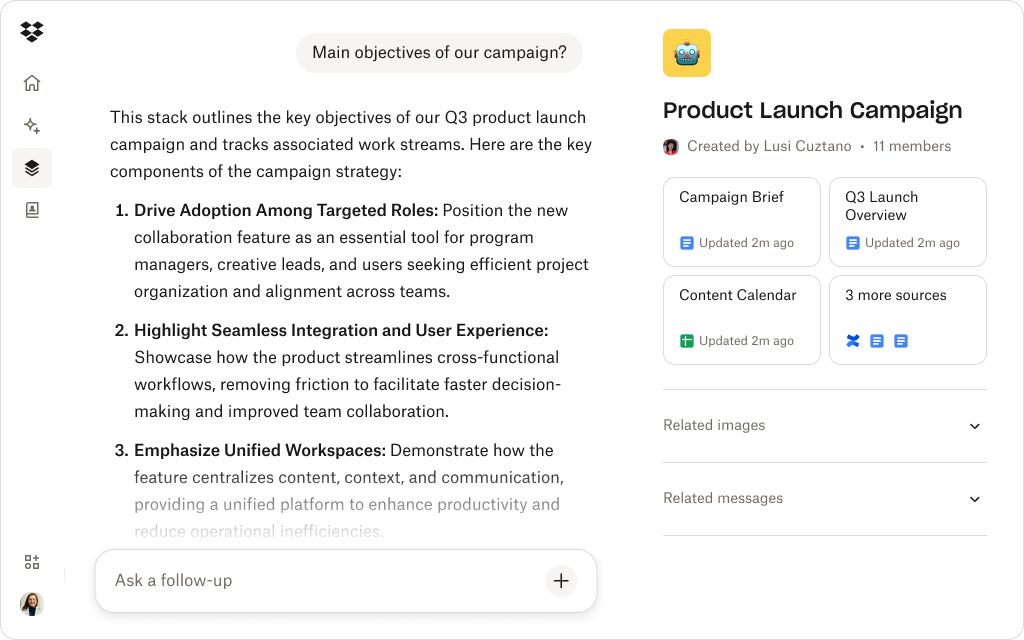
Dash Chat doesn’t just generate—it collaborates. You can ask, “What does our GTM plan say about this product’s launch audience?” or “Which value prop tested best last year?” It responds using your internal documents, giving AI the memory and judgment it’s always been missing.
Structure for speed
Stacks help you organize creative briefs, product details, visuals, and reports into one shared workspace. When you ask Dash to write a one-pager, it pulls directly from that Stack—reducing rework and keeping every draft aligned with your brand and strategy.
Accurate and on-brand
Because Dash builds from your approved sources, it doesn’t invent or exaggerate. Every fact, phrase, and visual comes from verified data. The result is confident, on-brand content that reads like it came from your team—because it did.
Dropbox Dash turns AI from a writing shortcut into a creative collaborator—helping you produce one-pagers that move fast, sound right, and stay true to your brand.
How teams turn AI drafts into confident, on-brand work
Even with Dash, the human touch still matters. The best teams combine structure with strategy — here’s how they make AI collaboration second nature.
Accuracy in AI writing isn’t just about better prompts—it’s about better grounding. The difference between an AI draft that reads “close enough” and one that feels exactly right lies in the context it pulls from.
Teams that consistently produce high-quality AI outputs follow a different approach:
- They connect AI to their actual content: Rather than prompting from a blank page, they use tools like Dash to give AI visibility into real briefs, decks, and approved messaging.
- They verify before they publish: The fastest drafts still need validation. Teams use Dash Chat to check facts, confirm claims, or summarize feedback directly from the source documents.
- They make iteration visible: Every version—and the reasoning behind it—is captured in Dash Stacks, so improvements become part of the workflow, not an afterthought.
With connected tools and contextual AI, teams stop treating AI as a shortcut and start using it as a collaborator.
Dash ensures every one-pager reflects your team’s expertise—not just a model’s best guess.
Writing smarter, faster, and more confidently with Dropbox Dash
The problem with most AI tools isn’t speed—it’s isolation. They work without access to the systems and knowledge that make your business unique.
Dropbox Dash fixes that. By connecting your apps, files, and creative direction, Dash ensures every AI output is grounded in real brand intelligence. The result? Faster turnarounds, fewer revisions, and one-pagers that actually hit the mark.
With Dash, teams move from drafting content to creating with conviction—knowing every word, fact, and tone reflects their brand’s truth.
Try a demo or contact sales to see how Dash helps teams turn AI speed into accuracy.
Frequently asked questions



.webp)