
.svg)

.svg)

Learn how to bring past campaigns back to life with universal search.
It’s frustrating, but most marketing or creative teams are sitting on a hidden treasure trove—folders full of campaign assets and ideas that once performed beautifully and now lie untouched. In an era of AI, when deadlines tighten or budgets shrink, those assets could save hours—if only people could find and reuse them effectively.
The problem is visibility. You can’t search for something you don’t know exists. Content often gets buried across old project folders and forgotten tools. That means, without a clear way to surface what already exists, teams end up rebuilding what they’ve already made. Dropbox Dash smashes that paradigm with AI-powered universal search.
By leveraging AI, teams can rediscover and reuse content effortlessly. With a tool that connects apps and interprets meaning—not just file names—Dash helps marketers and creatives bring their best work back into play.

Why teams struggle to reuse existing content effectively
Every marketing team knows the story—a campaign ends, the results are strong, and everyone moves on to the next project. Somewhere in the shuffle, great work gets buried. Those forgotten materials could inspire new campaigns, save hours of work, and strengthen brand consistency—but only if teams can actually find them.
Without centralized visibility, those materials disappear. Common causes of this include:
- Fragmented storage: Assets are often split across multiple drives, tools, or accounts. Unfortunately, the harder files are to find, the less likely it is they’ll ever be reused.
- Unclear ownership: Teams don’t necessarily know who created or last updated the original file version. Without accountability, even great content starts to feel unreliable.
- Redundant work: Content is commonly recreated from scratch instead of reused or adapted. That’s not ideal, as every new campaign starts from zero.
- Lost creative context: Busy teams tend to forget why or how a piece performed well in the first place. Without that initial performance insight, the lessons from success can disappear—along with the files.
This means wasted time, duplicated effort, and a growing content backlog that no one has time to explore. But when teams have the right visibility and structure, it’s easy for past work to start generating value. Tools like Dash give marketers the power to surface and reuse existing assets effortlessly—in large part due to universal search.
What makes universal search different from traditional search
It finds the right file even if you can’t remember what it’s called.
Universal search looks deep into files—rather than simply checking the filenames. The result is a search experience that feels more intuitive and intelligent.
Traditional search relies on exact matches and looks for limited criteria such as:
- Specific titles
- User or auto-generated tags
- File metadata
That’s all fine, but if a file doesn’t match your query perfectly—it won’t appear. And who in a busy marketing agency can remember precise file details, especially when you’re looking for reusable content you don’t know exists?
Universal search, powered by AI, changes the rules. Instead of asking users to remember exact keywords, it looks into the context of files—interpreting the meaning and relevance of data across connected apps.
That means when you type “holiday campaign visuals” or “last year’s product launch copy” into a universal search tool like Dash, it searches across Slack, Google Drive, Docs, and other integrated tools. It recognizes similar phrasing, related assets, and even partial matches for better results.
How buried assets slow down campaign creation
A new campaign kicks off, the ideas are flowing, and someone says, “Didn’t we already make something like this last year?” What follows is a scramble, usually ending with the same conclusion—it’s faster to rebuild than to find.
When a new project begins, teams often start fresh because finding relevant past work feels impossible. The answers exist, they’re just buried beneath inconsistent naming, disconnected tools, and the passage of time.
This buried content leads to:
- Longer lead times—each new campaign begins from zero instead of building on proven work, so momentum stalls before fresh creativity even starts
- Inconsistent brand quality—without reference assets, tone and visual identity drift, meaning every project risks sounding or looking like a slightly different brand
- Creative fatigue—teams focus on redoing logistics instead of refining ideas, resulting in energy that should go into innovation getting spent on repetition
Imagine a creative agency launching a new product video. The scripts, storyboards, and design assets from a previous campaign could provide a starting point. But if those materials are stored under inconsistent naming conventions or on different platforms—they might as well not exist.
Universal search helps solve this by turning disorganized asset archives into searchable libraries of inspiration. By using this and other AI-powered Dash features, your best ideas are ready to repurpose at scale.
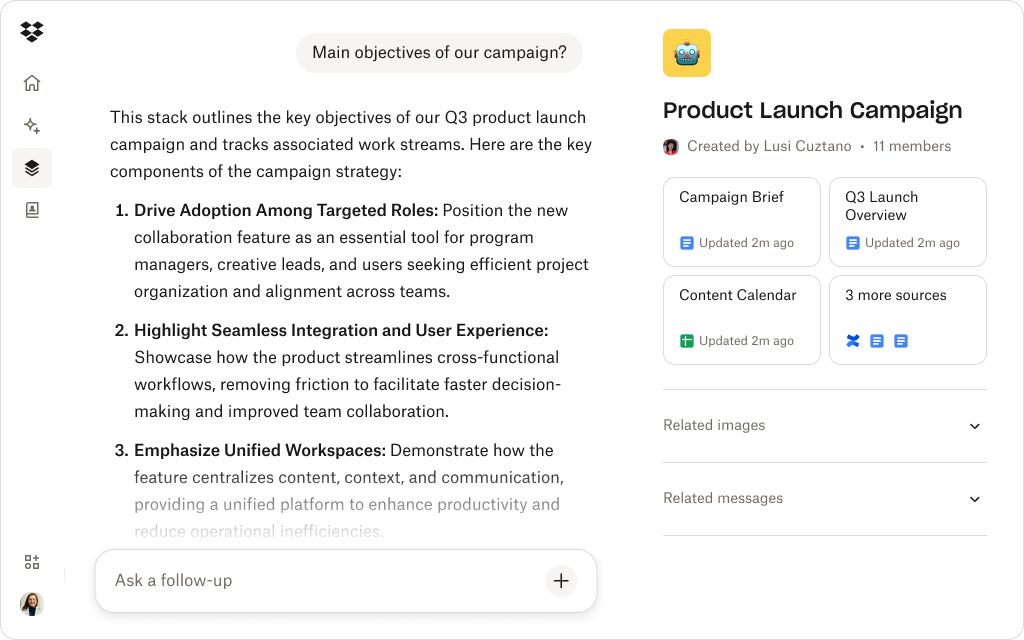
How Dropbox Dash universal search helps teams discover and reuse great content
Dash brings visibility, context, and control to the content reuse process. It locates old files and helps teams understand which ones matter and how to use them effectively.
Here are a few key ways Dash lets you do that:
1. Context-aware discovery with universal search
AI-powered universal search is where smart reuse begins. Instead of relying on exact filenames or tags, Dash understands intent—it looks inside files and across connected tools like Dropbox, Google Drive, and Slack to surface relevant materials.
Type a query like “product launch visuals from last year”, and Dash finds the right decks, images, and copy—even if you can’t remember where they live or what they were called. It learns from patterns, themes, and relationships between assets, so every search feels like it was made for you.
2. Dash Chat content summaries and previews
Once you’ve found a file, Dash Chat can help you decide what to do next. Its AI summaries and previews quickly show what’s inside a document—so you don’t have to open every version to find the right one.
Whether you’re reviewing campaign results or identifying assets to refresh, Dash Chat acts like a built-in creative helper, enabling teams to see value at a glance and prioritize what to reuse.
3. Stacks for organization
To make reuse easier over time, Dash lets you organize related assets into Stacks—curated collections where you can group decks, visuals, and reports by campaign or client. Each Stack becomes a ready-to-use foundation for future projects, ensuring nothing valuable gets buried again.
Stacks can turn your archive into a living library—helping teams scale output, maintain brand consistency, and collaborate in a chaos-free environment.
4. Cross-tool connections
Universal search works best when it’s everywhere. Dash connects all your apps seamlessly and unites tools, to provide a single workspace that eliminates endless tab-switching.
With one query, you can surface a deck from Dropbox, a campaign discussion from Slack, and supporting data from stored documents—all in one view. It’s a connective layer that turns scattered content into a searchable ecosystem.
5. AI-powered brainstorming with Dash Chat
Once universal search surfaces relevant materials, the Ask and Write features in Dash Chat can analyze tone, structure, and performance insights to suggest new ways to reuse them. A report becomes a blog post, a case study turns into social snippets, and an internal presentation becomes campaign-ready—all within seconds.
By combining universal search with AI writing capabilities in Dash, creativity scales effortlessly—helping teams reuse top-performing assets faster while keeping every piece on-brand.
Together, these features help teams reuse existing materials faster and unlock more value from every creative effort. With these features and a savvy team, Dash transforms content reuse—helping you create more with less.
Universal search for simpler content reuse
AI-powered universal search in Dash helps teams find, adapt, and reuse content from across your workspace—giving them the power to transform stored assets into new opportunities.
Best practices for content reuse with universal search
Effective content reuse starts with visibility—and universal search in Dash makes that possible. By connecting apps and surfacing context instantly, Dash helps teams find, understand, and adapt their best work.
Here’s how to make the most of it:
- Search by idea, not filename—use universal search to find assets by theme, campaign, or keyword, even if you can’t remember what they were called.
- Keep context close—when you find old content, use Dash Chat to summarize the associated files like campaign notes or performance insights.
- Use Stacks to curate reusable assets—turn your search results into organized collections by grouping files into Stacks.
- Link your ecosystem—connect all available tools in Dash, so each universal search works across everything you use.
- Refresh thoughtfully—once universal search surfaces a great asset, try Dash Chat’s write feature to help adapt it for new formats or audiences and turn a past campaign into fresh creative.
By combining universal search with other key features, teams can skip the busywork and focus on making great ideas go further. Dash helps give every campaign a second life, helping you reuse smarter and create faster.
Reuse smarter for more flexibility with Dropbox Dash
Instead of starting from scratch, creatives can start from success with universal search in Dash—so teams can explore their entire archive to find inspiration, securely reuse materials, and build smarter campaigns faster.
AI-powered search helps teams rediscover valuable content and turn past campaigns into future wins. See how Dash helps teams save time and stay creative—try a demo or contact sales to get started.
Frequently asked questions

.jpeg)

.webp)