
.svg)

.svg)

Share it, find it, move fast—Dropbox and Dash help your team work smarter.
Creative and marketing teams work fast—but often spend just as much time trying to find files as they do using them. Between disconnected tools, lost links, unclear permissions, and scattered content, collaboration starts to feel more like coordination.
Dropbox has long been the foundation for secure team file sharing. With robust sync and permissioning, it's trusted by small teams to protect their most important work. But what happens after the file is uploaded?
That’s where Dash for Dropbox comes in. Together, they add a layer of intelligence to your Dropbox workspace—helping teams surface what matters faster, stay organized, and collaborate confidently without sacrificing security.

Why traditional file sharing isn’t enough
Sharing files is one thing. Finding and using them later is another.
Even with cloud storage, teams face growing pain points:
- “Where’s the latest version?”
- “Did we already make a deck for this client?”
- “Why do I have to ask again for access?”
When content gets lost across platforms, creative teams slow down. They duplicate work, miss approvals, or risk sharing the wrong version. And as content libraries grow, discovery becomes just as critical as delivery.
Dropbox file storage and sharing: Trusted, secure file sharing for teams
Dropbox file storage and sharing is the trusted core that powers millions of creative and marketing teams. It's built for fast sync, seamless collaboration, and enterprise-grade security—with:
- Granular permissioning to control exactly who can view, edit, or comment
- Version history to resolve conflicts and recover older work
- Team folders and admin controls that keep everything organized and protected
- Proven reliability trusted by design firms, agencies, studios, and consultants
Dropbox is the go-to for secure file storage, organization, and sharing. However, today’s teams need more than a place to keep content—they need smart ways to surface, repurpose, and take faster actions in every workflow.
Dropbox and Dash: AI-powered discovery that respects permissions
Dropbox Dash brings AI discovery directly into your existing workflows. Dash adds intelligence with search, summaries, and content organization, connecting seamlessly with your existing Dropbox account.
Together, they form a secure and efficient system that empowers teams without disrupting how they already work.
Dash
Think of Dash as a connecting tool—helping you find, reuse, and work on your files without changing how your team works. Here are some key features it provides:
- An intelligence layer that sits on top of Dropbox
- AI-powered discovery, search, Chat and summaries, and content organization
- Works with content teams are already sharing
- Search and summarize multiple connected apps in addition to Dropbox, no need to switch tools or change workflows
Together: A complete system
Together, Dropbox and Dash create a complete system—combining secure storage with AI-powered discovery and organization, which keeps teams aligned and campaigns moving. It does this through:
- Dropbox file storage and sharing—secure storage and file sharing
- Granular access control—summaries and suggested content
- Team folder structures—smart Stacks to group campaign files
- Reliable sync and permissions—permission-aware search and results
Permissions and privacy
With Dash connected to Dropbox, permissions and privacy stay intact—so teams can benefit from AI-powered discovery without exposing sensitive content. This means:
- Dash respects Dropbox permissions
- If a user cannot access a file in Dropbox, they will not see it in Dash search or summaries
- Ensures AI-powered discovery without compromising privacy
This pairing—secure at the core, smart at the surface—is what sets Dropbox and Dash apart from generic AI tools.
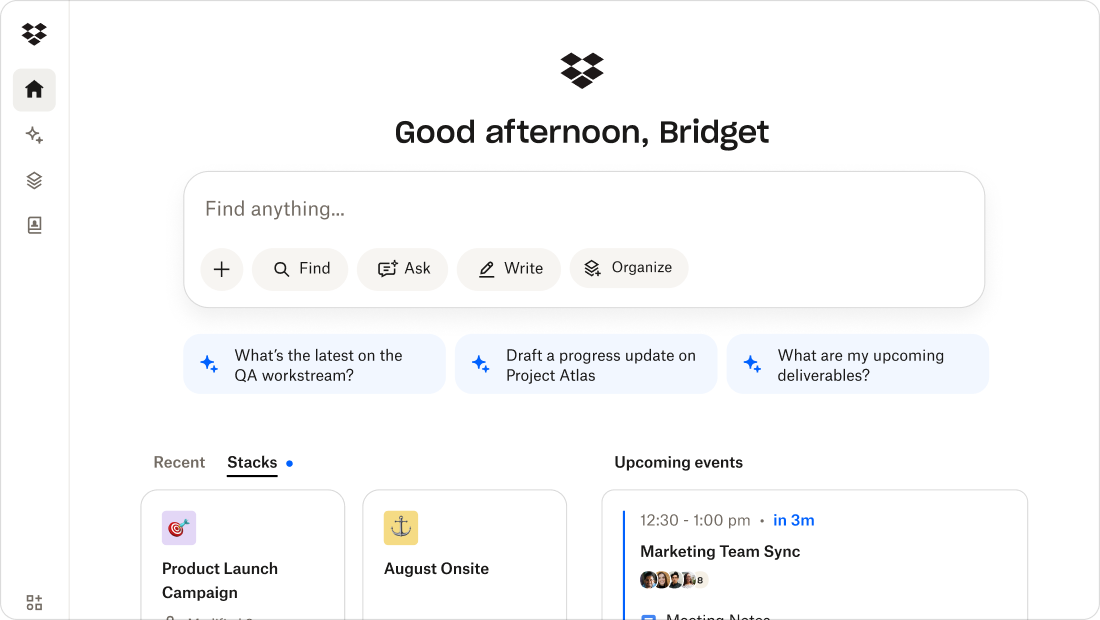
Real collaboration starts with context
Creative and marketing teams need files with the information that makes working with them easier. Campaigns move quickly, and there's no time to look for files or keep track of versions—but Dropbox and Dash team up to store files and leverage AI.
Context helps teams find files easily, understand them, and focus on their work. Dash gives creative and marketing teams the power to:
- Search across Dropbox by concept, not just filenames
- Summarize content (briefs, decks, transcripts) without opening the file
- Group assets into Stacks—smart collections that can be shared, reused, and referenced
- Find past work instantly when planning new campaigns
For example:
- A creative director can search “Q4 campaign images” and see all relevant assets across Dropbox
- A project manager can summarize the last feedback round before a client call
- A marketing lead can build a stack that organizes campaign assets by audience or channel
Dash meets teams where they already work—and removes the friction that slows them down. This can help in turning everyday tasks into faster, smoother, more collaborative workflows.
Stay focused, not searching
Bring AI-powered search and summaries to your Dropbox content with Dash.
Start smarter collaboration today
Dropbox protects your content. Dash makes that content smarter, and brings it all together—connecting AI discovery, summaries, and organization seamlessly with your existing Dropbox account.
The result is a secure, permission-aware workspace where collaboration moves at the speed of ideas. Built on Dropbox’s trusted foundation and powered by Dash intelligence, it delivers smarter, faster teamwork without extra tools or extra risk. Just confident collaboration. Experience Dash.
Frequently asked questions



.webp)