
.svg)

.svg)

Add AI to your file storage system and unlock smarter, faster workflows.
Dropbox is already the go-to file storage system for many creative and marketing teams. But static folder structures, deep file hierarchies, and siloed content often make it hard to find the right file, follow project context, or maintain momentum during execution.
AI-enhanced file storage doesn’t replace folders—it transforms them. With Dash, teams can layer intelligence on top of their storage to surface the right files, summarize context, and keep creative work moving with less friction.
This guide explores how AI-powered storage upgrades like Dropbox and Dash are redefining how small teams work in Dropbox.

Why file storage systems need smarter workflows
Dropbox made it simple to store files in the cloud and access them from anywhere, on any device. Syncing across desktops, laptops, and mobile means you’re never without your work.
But while access has improved, the folder itself hasn’t really evolved. Teams are still limited to static structures—one file in one place, shared links, or shortcuts—and that approach doesn’t keep pace with modern, fast-moving projects.
When you're managing campaign decks, feedback threads, and project docs across multiple departments, content quickly becomes confusing, duplicated or lost in version chaos.
Common issues for growing creative teams include:
- Digging through folders to find the latest asset
- Recreating work because context was buried or misfiled
- Wasting time asking “Where’s the final version?”
Static folder structures just don’t scale with the pace of work. What teams need is a smarter, more dynamic way to surface, structure, and act on their content.
What makes a strong storage system intelligent
In the early days of the internet, finding information was clunky. You had to know the exact website address or stumble across it by word of mouth. Then search engines arrived. Suddenly, the entire web became searchable and accessible to anyone, with a few keywords. It fundamentally changed how people interact with information.
File storage today feels a lot like the internet before search engines. You still have to know the folder, the filename, or the person who shared it with you. AI is about to change that.
A modern, AI-powered file system doesn’t just store your content—it makes it instantly usable. With universal search and conversational AI, you can surface the right files from anywhere, or better yet, skip the files entirely and pull the exact information you need.
Smart file systems typically help teams by:
- Letting you search across tools by meaning, not just file names
- Summarizing long docs, transcripts, or notes into quick takeaways
- Suggesting related files and resources when you need them
- Triggering tasks and workflows based on the content you’re working with
- Keeping access secure with built-in permission controls
These capabilities make teams faster, clearer, and better equipped for handoffs or complex projects. But intelligence only matters if it works securely and in the tools you already rely on—which is why the next wave of file storage combines AI with trusted platforms like Dropbox.
The future of storage isn’t about endlessly filing things away—it’s about making organization smarter and lighter. With conversational AI, you’ll be able to ask for a project detail or campaign asset and get the answer in seconds, whether it lives in Dropbox, Slack, or beyond. The focus shifts from managing files to unlocking knowledge.
From storage to intelligence: Secure AI for your files
Of course, for AI to truly transform file storage, it has to work securely within the systems teams already trust.
In this context, AI isn’t about uploading everything to a chatbot or letting technology automatically move your files around. It’s about making access, discovery, and organization smarter—without compromising security or structure.
That’s exactly what Dropbox Dash does. Operating on top of your existing file system, Dash connects across tools to help teams:
- Cut through clutter: Surface the exact file or detail you need in seconds
- Catch up with context: Turn long threads and notes into clear, actionable takeaways
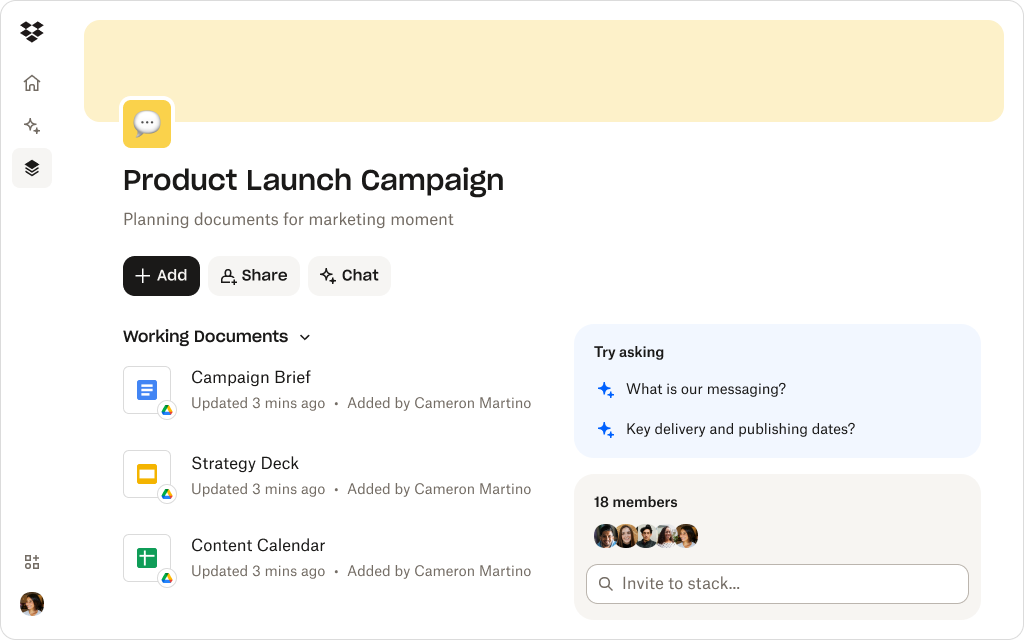
- Work in flexible spaces: Build project-specific hubs that keep related content together
Your content stays where it is—Dropbox folders, Slack threads, Notion docs—but becomes instantly more searchable, contextual, and usable across teams. And because Dash can be connected seamlessly with your Dropbox account, AI doesn’t just feel powerful—it feels familiar, safe, and ready to use.
How Dash elevates Dropbox
Dropbox Dash already gives teams AI-powered search, summaries, and workspaces across all their content platforms. When combined with the capabilities of Dropbox—such as the ability to access files from anywhere, advanced file sharing controls, and content collaboration tools—Dash elevates these features to new levels.
Dash works across tools and brings it home to Dropbox
When connected with Dash, your Dropbox file system becomes smarter without changing how you store or share:
- See the story at a glance: Get AI summaries for files in a single click, so you can catch up in seconds
- Search by meaning: Find the right asset across Dropbox and connected tools, even if you don’t know the filename
- Work in context: Results surface what’s most relevant to your project, right when you need them
- Stay organized without effort: Stacks help you group related files by campaign, phase, or intent—not just folder location
Dash is ideal for teams who live in Dropbox every day and need their folders to work as hard as they do. It transforms familiar folders into an AI-native workspace that helps you move faster, cut down time hunting for assets, and preserve project history for smoother handoffs.
Dash makes Dropbox more than a storage system—they turn it into a workflow engine. Your files stay where they are, but your team gains the intelligence to move faster, stay aligned, and keep projects flowing.
From folders to workflows
Bring Dash AI capabilities to your Dropbox files—with universal search, summaries, and smart context.
Make your next folder smarter
If static folders are slowing your team down, it’s time to add intelligence on top. By connecting Dash to your Dropbox account, your files stay exactly where they are—but become easier to find, understand, and act on.
Make Dropbox your workflow engine. Connect Dash to turn static folders into dynamic, AI-powered workspaces. Try Dropbox Dash.
Frequently asked questions



.webp)