
.svg)

.svg)

AI can write fast—but when it gets ad copy wrong, the cost goes beyond just creativity.
AI has become every marketer’s fastest copywriter. Tools can churn out headlines, taglines, and body copy in seconds—but speed isn’t the same as accuracy or creativity.
When left unchecked, AI-generated ad copy can introduce compliance issues, weaken messaging, or drift off-brand. For small teams juggling multiple campaigns, these mistakes don’t just cost clicks—they can cost trust and credibility.
Fortunately, there’s a fix. Once your tools can reference real brand guidelines and approved assets, suddenly the output starts to sound like you—rather than someone who just discovered the internet’s most generic template.

Why AI-generated ad copy often falls short
AI tools are great at pattern recognition but weak at context. They mimic tone and format based on what they’ve learned from public data—but they don’t inherently understand your brand voice, your audience, or your compliance requirements.
That’s why even the most advanced AI ad copy generators tend to miss the mark:
- They generalize tone and personality
- They reuse phrases that feel cliché or overused
- They hallucinate claims or features that don’t exist
- They ignore compliance or industry-specific restrictions
- They lack cultural nuance or sensitivity
AI doesn’t miss because it’s lazy—it misses because it’s disconnected. Without access to your real brand context, it writes for anyone, not your audience.
Common AI ad copy mistakes (and what causes them)
Here’s where AI ad copy tends to go wrong—and how to spot the red flags before hitting publish:
1. Weak or generic calls-to-action
AI loves familiar patterns like “Learn more,” “Buy now,” or “Get started.” They’re safe but uninspired. Generic CTAs fail to drive engagement because they lack urgency or relevance.
Fix it: Ground your CTA in real campaign goals or brand tone.
- Before: “Learn more about our new design platform.”
- After: “See how leading creators bring ideas to life—free trial today.”
When your CTA connects to a real customer goal, every click feels like momentum—not marketing.
2. Off-brand voice
An AI model trained on public data can’t replicate your brand tone without reference materials. The result? Copy that feels robotic or inconsistent across channels.
Fix it: Use Dash Chat to prompt AI with brand guidelines, tone examples, or approved messaging stored in Dropbox.
- Before: “Our platform helps you scale your business.”
- After: “From your first brief to your next breakthrough—create at the speed of inspiration.”
Grounding AI in your own voice turns generic copy into language only your brand could write.
3. Compliance risks
AI doesn’t know your industry’s ad rules. Financial services, healthcare, and legal teams, for example, face strict guidelines that AI often overlooks—like making unverifiable claims or omitting required disclosures.
Fix it: Keep compliance-approved templates and disclaimers in Dropbox or connected app.
- Dash can surface those files when AI output needs review or an added disclosure.
When compliance lives in your workflow, reviews move faster and approvals feel effortless.
4. Repetition and redundancy
AI models tend to recycle the same structures and adjectives—especially when generating multiple ad variants. That sameness makes your campaigns blend into the feed instead of standing out.
Fix it: Store your top-performing copy in Dash, so AI can build from real examples—not generic patterns.
- Ask Dash Chat: “Show me the headlines and messaging our team highlighted as top performers last quarter.”
- Dash surfaces what your team has already documented—in wrap-up decks, Slack threads, email summaries, campaign reports, and more.
Using real, human-selected copy as your creative fuel keeps new ideas fresh—while staying grounded in what’s actually worked for your brand.
5. Misaligned creative context
AI rarely knows what image, design, or video it’s writing for. That disconnect creates copy that doesn’t match visuals—resulting in lower click-through rates.
Fix it: Keep visuals, copy, and briefs in one Stack.
- Dash ensures AI references the right creative context—so words and visuals align.
When your visuals and copy speak the same language, your message lands instantly.
These are easy errors to make—but with systems that link AI directly to your brand’s real context, they’re just as easy to prevent.
How off-brand or noncompliant ads hurt performance
Even the strongest creative strategy can fall apart if your message drifts off-brand—or worse, out of compliance.
When ad copy doesn’t reflect your brand’s voice or meet your industry standards, audiences notice. And once trust is shaken, every impression costs more to win back.
Ad performance depends on clarity and credibility. When AI-generated copy strays off-brand or violates compliance, the cost is real:
- Lost conversions: Customers hesitate when copy feels inconsistent or confusing
- Higher revision costs: Teams spend hours rewriting AI drafts that didn’t fit brand tone
- Compliance exposure: A single unchecked claim can create legal or reputational risk
What might start as a quick win can quickly become an expensive redo. Rushed copy trades precision for speed—and in marketing, quality always wins. The brands that take the extra moment to verify, align, and ground every message in truth aren’t just compliant—they’re confident.
What good AI ad copy actually looks like
The difference between mediocre AI copy and meaningful AI copy isn’t creativity—it’s connection.
The strongest AI-assisted work comes from grounding AI in your brand’s real context, much more than clever prompts. When AI understands your goals, guardrails, and voice it can write with the same confidence as your team does.
Effective AI-assisted copywriting starts with alignment. Instead of generating from scratch, the most reliable AI outputs build on your existing brand content, assets, and data.
Good AI ad copy is:
- Rooted in real assets—grounded in accurate product info and campaign goals
- Tone-consistent—sounding unmistakably like your brand
- Action-oriented—driving a clear next step
- Verified—backed by data and approved creative proof points
When AI has access to that kind of context, copy stops sounding automated and starts sounding authentic.
Dropbox Dash helps AI reach that standard by connecting your writing tools to the materials that already define your brand—so every ad reads like it came from your team, not a template.
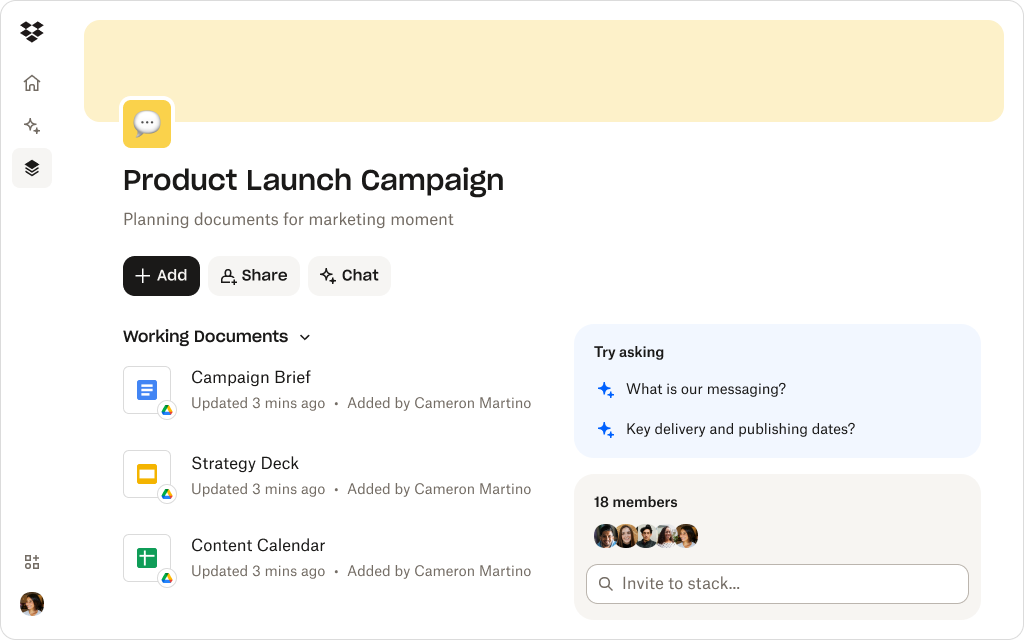
How Dropbox Dash keeps AI copy accurate, compliant, and on-brand
Dash doesn’t just help teams write faster—it helps them write smarter. Here’s how it closes the gap between AI’s speed and your brand’s precision:
Connected content for accuracy
Dash links to Dropbox and connected app folders containing approved copy decks, messaging frameworks, and creative guidelines. When using Dash Chat, AI pulls information directly from those trusted sources.
That means every draft starts from facts, not assumptions—reducing errors before they happen.
Context-rich collaboration
Dash Chat doesn’t write in isolation—it works within your campaign’s Stack. You can ask, “Does this copy align with our Q4 positioning?” or “Which CTA performed best last quarter?” and get answers based on your team’s actual data.
Teams get real-time feedback in context, so AI becomes a creative partner, not just a text generator.
Compliance-friendly workflows
Because Dash inherits Dropbox permissions and encryption frameworks, AI only accesses files it’s authorized to use. That means compliant teams can safely explore AI without exposing sensitive materials.
Security and creativity finally coexist—so compliance never slows down innovation.
Reusable templates and insights
Keep top-performing ad copy and templates organized in Dash for easy reference. Teams can reuse proven frameworks without repeating mistakes.
Past success becomes the blueprint for the next great campaign.
With Dash, AI copywriting becomes a guided process—not a guessing game.
Refine every ad copy with brand context
Dash Chat helps teams rewrite and review AI-generated ads using connected brand assets, approved messaging, and compliance-ready templates—all in one workspace.
Tips for improving AI ad copy with Dropbox-connected workflows
The best AI ad copy isn’t luck—it’s the result of structure that supports creativity. By building a system around how your team works, you can help AI generate ideas that are faster, sharper, and more aligned with your brand.
To make the most of AI-assisted ad writing, build structure around creativity:
- Centralize brand materials: Store tone guides, compliance notes, and templates in Dropbox so Dash Chat can access them when refining copy.
- Create campaign-specific Stacks: Group visuals, messaging docs, and performance data together for context-rich AI prompts.
- Use AI for iteration, not invention: Let Dash Chat reframe or optimize your drafts rather than starting cold.
- Review before publishing: Even great AI needs human approval. Use Dash to track reviews and final sign-offs.
- Capture learnings: Store performance results in the same Stack. Next time, ask Dash Chat to summarize what worked—and why.
When your creative process lives in one connected workspace, AI doesn’t just keep up—it keeps learning. Each campaign makes the next one smarter, turning your workflow into a continuous feedback loop of creativity and insight.
Writing faster—and smarter—with AI you can trust with Dash
AI doesn’t replace creativity—it accelerates it when guided by structure. Dropbox Dash connects your AI tools to your real brand assets, helping teams write faster, stay on-message, and build ads their audience can trust.
See how Dash helps teams refine ad copy—try a demo or contact sales.
Frequently asked questions



.webp)