
.svg)

.svg)

How do you choose AI marketing tools that actually work together?
Every marketing team wants to move faster, create smarter, and make every campaign count. But today’s AI boom has created a new challenge—too many tools. Organizations need something that helps small teams do more with fewer tools. But, currently, many leaders spread their teams too thin.
You might use one platform to write copy, another to summarize research, another for asset management, and yet another for reporting. Each one promises time savings—but together, they create problems. Common issues include:
- Cluttered app libraries
- Confusion about what tools are approved for use
- Costs that add up, especially for unused AI apps
- Content access risks from multiple tools connecting to the same data sources
- Compliance and governance gaps from unmonitored AI use
Dropbox Dash changes that. Rather than adding another platform to manage, Dash connects to your existing tools—so your team can focus on creating, not coordinating.

Why choosing the right AI tools matters more than ever
AI is redefining how teams work. But adopting new tools without a strategy can make things worse before they get better. The last thing that leaders need is a bad decision to have to justify or explain down the line.
According to Microsoft’s Work Trend Index, 64% of employees struggle to find time and energy for focused work due to digital overload, while 70% would delegate as much as possible to AI.
That insight perfectly describes today’s marketing environment. Without integration, AI tools create more digital debt instead of reducing it. Choosing the right tools means picking those that help your team focus.
Imagine a marketing team juggling three different AI platforms for tasks like:
- Writing campaign copy
- Summarizing analytics
- Managing creative assets
Instead of saving time, they’re switching tabs, duplicating work, and losing track of which version of the brief is final. The right AI setup should connect all of those tools in one workspace—so insights flow directly into action.
The hidden cost of too many disconnected marketing apps
For small marketing teams, every tool subscription matters. Yet most organizations still juggle specialized tools across writing, design, collaboration, and analytics.
The downsides are clear:
- Redundant spend—multiple AI tools overlap in functionality, but bill separately
- Workflow friction—copywriters, designers, and campaign leads each use their own platforms
- Data silos—creative and performance data stay locked in different systems
- Lost context—ideas and insights are hard to find across files, chats, and decks
Consider an agency prepping a product launch. A strategist drafts messaging in one AI copy tool, a designer generates visuals in another, and an analyst tracks results in a separate dashboard. Each update lives in a different workspace, forcing the project manager to chase files, copy data, and reconcile versions before going live.
By the time the team aligns, deadlines have slipped, and creative energy is gone. A connected system could turn that same process into a single flow—where content, data, and approvals stay synced automatically, freeing the team to focus on the work that moves the brand forward.
What’s meant to save time often ends up multiplying administrative work. When every process depends on switching apps, focus disappears—and with it, creativity.
5 tips when choosing AI tools for small marketing teams
Finding the right AI tools shouldn’t mean rebuilding your workflow from scratch. The best choices make your existing tools work harder, not multiply the clutter.
For small marketing teams, the goal is to simplify—not scale complexity. These five tips will help you evaluate which AI tools actually fit your workflow, enhance creativity, and protect your data, without adding unnecessary friction:
- Compatibility: Look for tools that connect seamlessly with your existing systems—Dropbox, Slack, Google Workspace, or creative platforms. Your tools should talk to each other and prevent new silos from forming.
- Context awareness: Choose AI that can access your real files and data, not simply generate generic outputs. When tools understand your brand or tone documents, every result feels authentic and on-message.
- Ease of use: Avoid complex dashboards. The best tools work where your team already does. Friction kills momentum—simplicity keeps it alive.
- Security and governance: Always confirm that data remains protected and isn’t used to train external models. Creative freedom only thrives when information stays secure. Dash always respects existing tool permissions.
- Scalability: Select solutions that can grow with your team—whether you add campaigns, clients, or collaborators. Your systems should expand with your ambition and not hold it back when you grow.
The idea is to create a cohesive system that supports your creative process. Dash does that by connecting files, insights, and AI tools in one workspace. It’s how small teams achieve big results and avoid disconnected systems.
Common categories of AI tools and what they do
AI has quickly become important in modern marketing—but not all tools serve the same purpose.
Before you optimize or adopt new platforms, it’s worth knowing where AI delivers impact. Each category supports a different part of the creative process, and knowing the difference helps you choose more efficient, cohesive tools.
Before consolidating your marketing tools, it helps to understand where AI adds the most value in marketing:
- Writing and ideation tools: These generate copy, brainstorm ideas, and optimize messaging. Examples include Jasper, Copy.ai, or Writer—great for breaking through creative blocks or scaling content quickly.
- Design and visual tools: Some tools help non-designers create layouts and visuals with speed—like Canva Magic Studio or Adobe Firefly. They can make visual storytelling more accessible to every marketer.
- Research and summarization tools: These turn large data sets or reports into digestible insights. ChatGPT and Notion AI often fail here, but connected tools like Dash help teams move from information overload to clarity.
- Workflow and organization tools: Connect content, automate updates, and keep teams aligned. These tools keep projects moving smoothly as teams juggle multiple channels and campaigns.
This is where Dash leads—with universal search, contextual chat, and content organization all in one place.
Each tool type serves a purpose, but using too many at once creates overlap. Dash brings it all together—helping teams focus less on managing tools and more on creating work that feels connected, consistent, and on-brand.
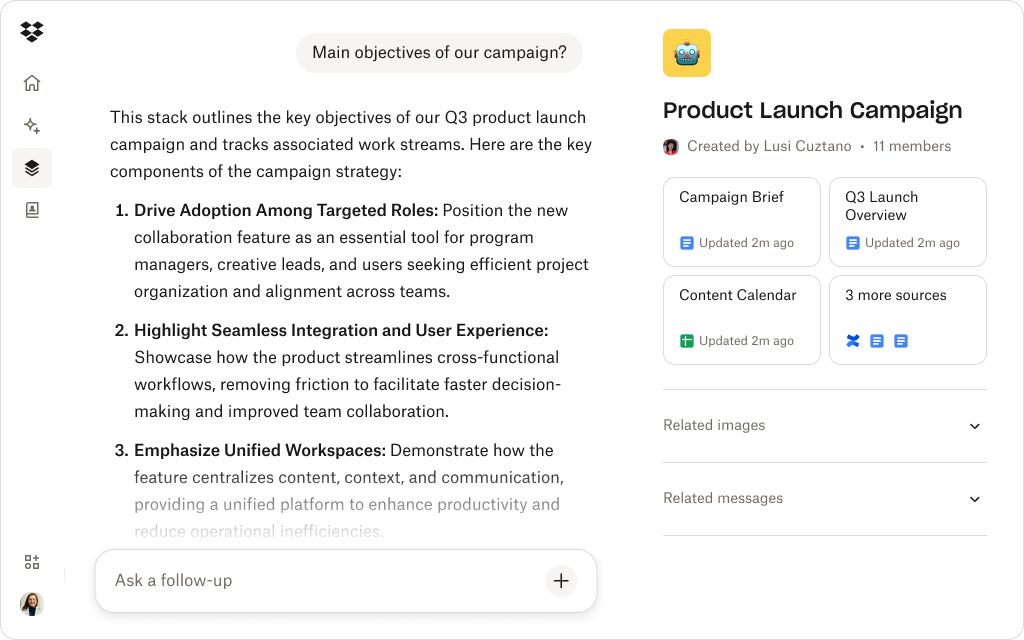
How Dropbox Dash consolidates AI capabilities in one workspace
AI-powered Dash features deliver an integrated AI experience built for creative and marketing teams—bringing everything together in one secure environment:
- Universal search for marketing content: Context-aware universal search in Dash connects to Dropbox, Google Drive, Slack, and many more surface areas, delivering the right decks, briefs, and creative assets in seconds. That means no more toggling between folders or remembering file names.
- Dash Chat for summarization and brainstorming: Teams can ask Dash Chat to summarize campaign results, condense meeting notes, or generate first drafts using real brand materials. Because Dash securely pulls from your internal context—not the open web—every summary stays accurate and relevant.
- Stacks for organized collaboration: Stacks provide a visual way to turn disjointed folders into structured, shareable hubs. Each Stack can hold campaign files, assets, briefs, and notes—making it easy to work from a single source of truth.
- Prompts for consistency: Looking for inspiration to get started? Check out the collection of examples in our prompt library, which can be adapted to suit your own needs and workflows. As Dash securely connects your data, you’ll get results based on your brand tone and context.
Instead of managing multiple AI apps, Dash helps teams use writing or summarization, search, and organization capabilities directly within their existing workspace. It’s a fantastic tool for marketing and many other use cases.
With fewer subscriptions, clearer workflows, and faster creative output, Dash helps small teams scale their impact without adding unnecessary complexity or overhead.
Streamline your AI workflow for marketing success
Dash Chat makes summarization, creative ideation, and iteration easier—all based on your securely connected marketing data.
How to evaluate AI tools for cost, integration, and results
The right AI system should enhance the way your team already works. Whether you’re a solo marketer or part of a growing creative team, success comes from tools that deliver value, connect seamlessly, and deliver real results.
Evaluating AI tools is about fit more than features. Use these criteria to guide your decision:
- Cost-to-value ratio—if you’re paying for features your team doesn’t use, consolidate where you can.
- Integration depth—does the AI connect directly to your storage, creative, and communication tools?
- Content accuracy—does the system pull from your actual data or rely on generic information?
- Ease of collaboration—can teammates access shared workspaces, files, and context easily?
- Measurable impact—track whether AI tools save real time or just shift tasks elsewhere.
Dash excels across all five. By layering AI into the workspace your team already uses, it simplifies workflows, reduces context switching, and helps campaigns move faster from idea to execution.
As a final consideration, make sure any tool you choose has strong security features. Dash has enterprise-grade security, which is built on the trusted Dropbox architecture—for complete confidence and control when using AI.
Simplifying your AI strategy for long-term efficiency with Dash
The AI landscape will keep evolving, but the challenge will always be the same—connecting creativity, content, and context. Dash gives marketing teams a system that does that easily and with complete security for your data.
Dash layers AI-powered search, summarization, and organization directly on top of your workspace. See how Dash helps marketing teams do more with less with a connected AI workspace—try a demo or contact sales today.
Frequently asked questions



.webp)