
.svg)

.svg)

Want to adopt AI workflows quickly, without revamping everything?
When leaders consider adopting AI tools, the fear is often the disruption. The idea of a full rebuild can feel too much for teams, especially when existing tools are already deeply embedded in day-to-day workflows. Leaders want outcomes, but not the headaches of:
- Pausing work
- Migrating systems
- Retraining entire teams
But AI doesn’t have to replace what already works. Tools like Dropbox Dash can layer onto it—giving your existing workflows an AI-powered productivity boost.
With a thoughtful approach, teams can start to unlock the new intelligence, faster decisions, and smoother workflows AI promises in a matter of weeks—not months—and without forcing everyone to change how they work.

Why teams hesitate to adopt new tools
Tool adoption stalls most often because of the hidden costs, which often includes the following:
- Onboarding time
- Behavior change
- The ripple effect of adjusting established workflows
Even when a new system promises improvement, teams may resist if they worry it will interrupt the rhythm of their work. Common worries and concerns you might hear from your team include:
- We don’t have time to slow down—teams fear that learning a new platform will derail active projects or delay launches, and the leadership will hold them responsible regardless
- Our current stack is messy, but it works—people worry that changing tools will break fragile, hard-won workflows that keep things moving
- Not everyone will adopt it—leaders know a tool only adds value if everyone actually uses it, partial adoption can create more silos, not fewer
- We’ll have to rebuild everything from scratch—the idea of migrating files, permissions, and processes into a new system feels risky and exhausting
- What about security and governance?—IT and ops teams are cautious about tools that introduce new access patterns or unclear data flows
Leaders want simplicity. They want a practical way to introduce AI that feels additive, not disruptive—something that makes their existing tools smarter, rather than asking everyone to start over.
The cost of large-scale rebuilds
A big platform overhaul can sound like a clean slate—one new system to fix old problems. However, those fresh starts often come with heavy hidden costs—especially for teams already running at full speed.
It’s not just about turning on a new tool, it’s about everything that has to bend around it. A full rebuild rarely means just installing new software—it usually involves:
- Reorganizing content across tools
- Re-establishing permissions and structures
- Rewriting processes or documentation
- Training teams to adopt new habits
- Managing delays while everything stabilizes
This is why many organizations sit in a holding pattern—yearning for the advantages of AI without the upheaval it traditionally requires.
What they need is a way to modernize without breaking what already works—an AI layer, that connects to existing systems, respects current structures, and adds intelligence on top instead of forcing a full reset.
What flexible tool adoption should look like
The most successful rollouts start with reality—your current tools, workflows, and the way people actually get work done today. From there, the question is “How can we make this better without forcing people to relearn their jobs?”
Strong tool adoption strategies meet people where they already work. Instead of replacing familiar systems, new tools should enhance them by:
- Connecting to existing storage and workflows—so your Dropbox, Google Drive, Slack, and other core tools become more powerful, not redundant
- Making everyday tasks faster, not different—helping teams search, summarize, and organize in fewer steps, without changing the underlying process
- Supporting a range of roles and working styles—from sales and marketing to operations and leadership, everyone should be able to plug in at their own pace
- Allowing teams to scale their usage gradually—starting with a few high-impact use cases, then expanding as trust and familiarity grow
When AI layers onto existing processes, adoption becomes smoother. The AI-powered features in Dash are built for exactly this kind of rollout—adding intelligence on top of the systems you already use, so teams feel empowered.
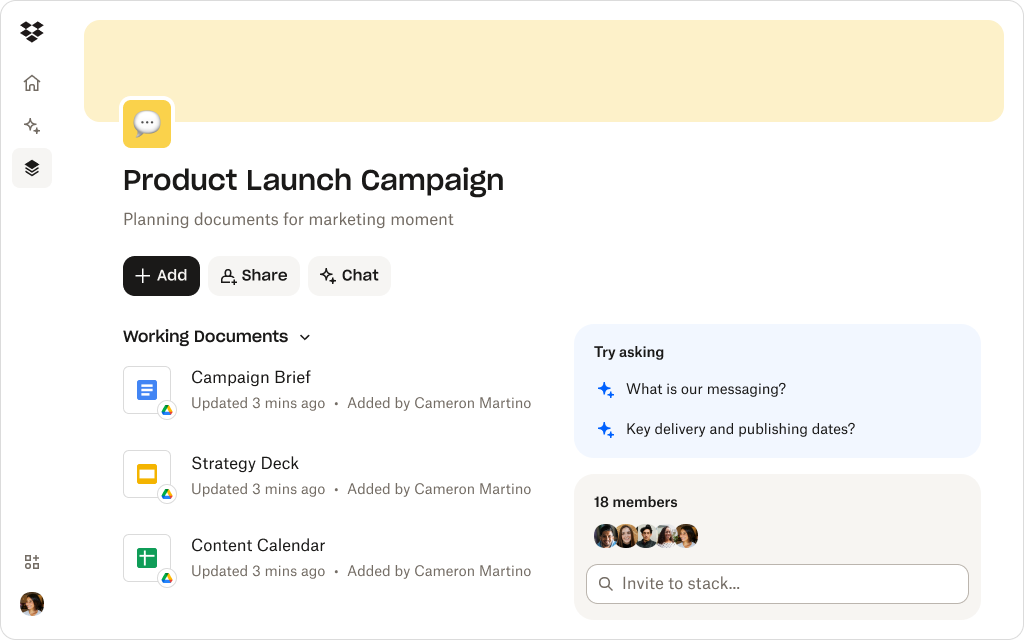
How Dash layers onto your existing workflows
Dash is designed to integrate with how teams already operate—whether they live in Dropbox, work across multiple cloud tools, or rely on shared drives, email, or chat. Here’s how it connects the workflows you already depend on:
1. Works with your existing tools—without disruption
Teams can begin using Dash without restructuring anything. It connects directly to content where it already lives, surfacing relevant information and helping people work more efficiently, without disrupting their day-to-day habits.
Consider this example. An in-house creative team already has years of work organized in Dropbox cloud storage. Rather than moving anything, they connect Dash and start using it across the same folders to summarize briefs, prep for reviews, and more. Designers still use their files—Dash just makes it faster to find the right one.
2. Universal search sweeps across tools
Dash pulls together files, links, and conversations from connected apps, making information easier to find without requiring anyone to reorganize or rename a thing—and turning “I know it’s somewhere” into a single, simple query.
Say a marketing manager prepping for campaign analysis needs a performance report from Drive, a creative brief from Dropbox, and feedback from a Slack thread. Instead of jumping between tools, they can use universal search to look up “campaign performance recap”. In seconds, Dash surfaces the relevant data—all from one search bar.
3. AI summaries and insights fit into existing routines
Instead of changing how people write, read, or review documents, Dash helps them get through content faster—reducing prep time and decision friction, while leaving familiar workflows intact.
Imagine a product lead is about to join a stakeholder meeting and only has minutes to catch up on a big strategy file and a long comment thread. They open the document in Dash and ask Dash Chat for “a summary of key risks and decisions.” Dash returns a clear overview they can skim quickly, so they go into the meeting informed.
4. Stacks provide structured clarity without behavior change
Teams can collate related content into one workspace without altering folder structures or moving files out of their current locations in Stacks, which creates a layer of project clarity on top of the systems they already know.
Let’s say an agency account director builds a Stack for a major client launch that pulls in files from multiple folders. Nothing moves from its original location in Dropbox—Stacks simply let you group everything in one view. The team and client both use that same Stack as their home base, eliminating confusion over where to look or what’s current.
With the above features, Dash adds value without forcing a rebuild, which makes AI adoption more sustainable.
Connect your existing tools to AI today
Dash makes it easier to adopt AI by connecting to the content and apps you already use to powerful new capabilities—so your team can build efficiency into their existing workflows.
A pragmatic roadmap for adopting Dash fast
The easiest way to introduce Dash is to weave it into work your team is already doing, start small, and let the value prove itself. When people see that Dash makes their existing workflows easier—adoption follows naturally.
Crucially, adopting Dash doesn’t require a multi-phase overhaul. Teams can begin benefiting quickly, here’s how:
- Start with one workflow—choose a single process to trial first, such as meeting prep, campaign planning, or customer conversations
- Connect your most-used apps—this makes Dash more powerful from day one, so bring in cloud storage, communication tools, and shared resources right away
- Introduce AI summaries and search—show teams how Dash Chat reduces time spent finding and reviewing information, which can encourage adoption
- Add Stacks for shared workspaces—use Stacks to group project files, recurring materials, or onboarding content without changing folder structures
- Expand gradually—once a few workflows see improvement, other teams naturally follow, so use the trial workgroup to help evangelize others
This layered approach builds momentum without a dramatic shift. You keep tools and structures, while Dash upgrades how everyone finds context, shares work, and makes decisions—so AI becomes part of the fabric of work.
Best practices for layering in AI without disruption
The most successful implementations are the ones that respect existing habits, tools, or workflows—and simply make them smarter. Best practices for layering in AI without disruption include:
- Keep existing tools in place—avoid ripping out systems that teams rely on, just add intelligence on top of what’s working
- Start with small, meaningful wins—focus on tasks that benefit immediately from faster search or summaries and build from there
- Let teams opt in—adoption grows more quickly when people experience the value firsthand, so let it the process grow organically instead of making drastic announcements
- Use shared workspaces, not new processes—Stacks help teams collaborate with clarity without asking them to change their habits
- Evolve naturally, not forcefully—as efficiency improves, teams can adopt more advanced features at their own pace
When AI is layered in thoughtfully, it feels more like a natural extension of how your team already works. That’s where tools like Dash shine—enhancing everyday workflows while leaving your core foundations firmly in place.
Transform your workflow with Dropbox Dash
Leaders want smarter workflows, not steep transitions. Dash helps teams upgrade how they find, summarize, and organize work using AI—without requiring a rebuild or a major shift in behavior.
By layering AI on top of your existing tools, no replacing them, Dash can accelerate outcomes while keeping your systems, content, and teams right where they are. Try a demo or contact sales today.
Frequently asked questions



.webp)