
.svg)

.svg)

Create accurate, on-brand sales collateral fast with tools built to help you work smarter.
Sales teams move at the pace of their prospects. Every conversation, pitch, and follow-up requires clear, tailored collateral and producing that collateral often takes more time than the selling itself.
Decks, one-pagers, case studies, and product explanations get rebuilt over and over because teams can’t find the latest version or the one that performed well last quarter. The result is slow turnarounds, inconsistent messaging, and too much time spent formatting instead of closing.
The right tools help sales teams reuse what works and customize what matters, that’s why we’ve put together 5 tools that can help you create high impact sales collateral for your clients, including Dropbox Dash.

Why sales teams need better collateral workflows
Sales content is only as powerful as your team’s ability to use it. Even with the most compelling decks and data, deals stall when you’re spending time tracking down assets, rewriting slides, or recreating what already exists.
Common roadblocks include:
- Searching across scattered folders for the “final” version
- Rewriting copy that already exists
- Revisiting design or messaging choices that were solved in the past
- Switching between too many tools just to assemble a deck
These slowdowns add up fast—especially when every prospect expects personalized content at every stage. When finding and personalizing collateral becomes effortless, sales teams get time back to focus on connecting with customers.
What makes collateral “client ready”
Making sales collateral truly client ready is about precision. Every asset that leaves your team’s hands needs to reflect the latest thinking, the right message, and the right context for the person on the other end. It also must be:
- Accurate—reflect up-to-date product information and positioning
- On-brand—match tone, visuals, and messaging guidelines
- Tailored—speak directly to a prospect’s industry, use case, or pain point
- Consistent—align with the rest of your sales materials
- Easy to update—built from components that can be reused, remixed, or refreshed quickly
Tools like Dash that enable these qualities, help teams move from reactive content creation to confident, scalable selling. When every piece of collateral hits that standard, sales conversations feel seamless and credible.
Dash adds a layer of intelligence to that process by surfacing high-performing content and helping teams generate on-brand collateral without starting from zero.
5 tools for creating strong sales collateral quickly
Creating sales collateral that’s both compelling and up to date doesn’t have to be a long, manual process. The right tools can help teams move faster, from finding approved assets to tailoring decks for specific prospects, without sacrificing quality or brand consistency.
Whether you’re tightening your turnaround time or scaling personalized content across regions, these five tools can help your sales team build materials that impress, inform, and close deals fast.
1. Dropbox Dash
Dash gives sales teams instant clarity into what already exists. With universal search, reps can surface the right deck, case study, one-pager, or product sheet fast—even if they don’t remember the file name. Dash Chat can summarize long documents, extract key benefits, or help tailor messages for specific industries or roles.
Why sales teams use Dash:
- Finds high-performing content quickly
- Summarizes product docs into prospect-ready explanations
- Helps generate on-brand collateral using your real files
- Keeps Dropbox permissions fully intact for secure sharing
- Works with the content system you already use
Dash becomes a starting point for success, not a place where work gets recreated.
2. Canva
Canva makes it easy for sales teams to turn ideas into visually polished decks and one-pagers in minutes.
With ready-made templates, brand kits, and drag-and-drop design, teams can produce on-brand, client-ready materials without needing a designer on standby. It’s a simple way to keep collateral consistent, eye-catching, and fast to deliver.
Strengths:
- Wide template library
- Accessible for non-designers
- Easy brand kits for consistency
Limitations:
- Hard to manage multiple versions across teams
- Not built for finding older or high-performing content
3. Google Slides
Google Slides gives distributed sales teams a shared workspace to build and refine decks together in real time.
Cloud-based editing keeps everyone aligned on the latest version, so updates to messaging or visuals flow instantly across the team. It’s built for collaboration and so is ideal for keeping collateral accurate and in sync, wherever your sellers are working.
Strengths:
- Real-time co-editing
- Easy sharing and commenting
- Integrates well with Drive
Limitations:
- Requires manual organization to avoid version drift
- Slow to tailor without additional reference materials
4. Pitch
Pitch combines design flexibility with collaboration speed, making it a strong choice for teams who need to create and iterate quickly. Dynamic templates, analytics, and version control help sales teams deliver sharp, data-backed presentations that stay on message.
Strengths:
- Fast deck creation
- Team-friendly review tools
- Modern templates built for sales storytelling
Limitations:
- Less flexible for non-presentation collateral
- Requires separate storage outside your larger content library
5. Miro
Though best known for brainstorming, Miro is increasingly used to visualize customer journeys and map value propositions for sales collateral.
It brings structure to the messy early stages of collateral creation. From mapping customer pain points to visualizing story flow, it helps sales and marketing teams brainstorm and organize content before the design work begins. The result is collateral built on stronger ideas—faster, clearer, and more connected to the buyer’s journey.
Strengths:
- Great for collaborative thinking
- Useful for structuring complex solutions
- Helps teams translate strategy into messaging
Limitations:
- Not ideal for finished collateral
- Requires export to other tools for final deliverables
How Dropbox Dash helps teams tailor collateral with confidence
For sales teams, speed and precision matter just as much as creativity. When every prospect expects personalized content, teams can’t afford to waste time searching for the latest version of a deck or rewriting slides from scratch.
Dropbox Dash gives sellers a connected workspace where everything they need like files, insights, and context are instantly within reach with the following three core features.
Universal search
Universal search brings all your collateral together, no matter where it lives. Instead of digging through scattered folders or toggling between apps, sales reps can instantly surface the right version of a pitch deck, product sheet, or messaging doc across Dropbox, Google Drive, Slack, and beyond. It’s one search bar that understands your work and gets you to the final file.
Dash Chat
With Dash Chat, teams can move from searching to shaping content in a single step. It helps tailor materials faster by drawing directly from your company’s own files, not the open web, so every message stays accurate and on brand. You can ask Dash to:
- Rewrite content for a specific industry or buyer type
- Summarize technical information for non-technical audiences
- Extract key talking points from product documentation
- Suggest messaging angles or headlines based on existing collateral
Dash turns your stored content into ready-to-use insights, helping sales teams personalize confidently without starting from scratch.
Stacks
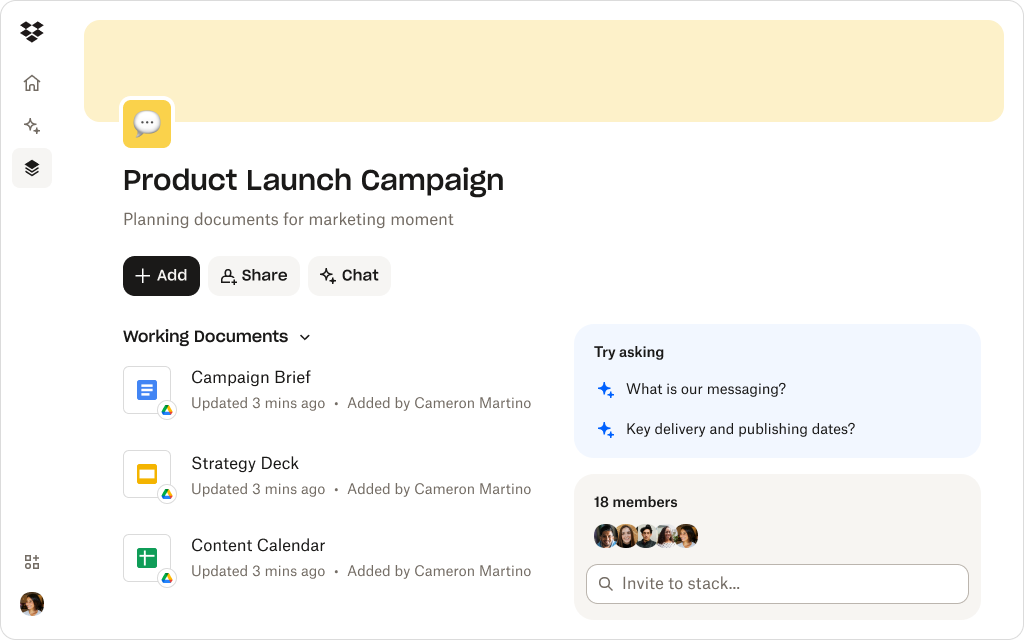
Stacks make it easy to package the right materials for each client without creating endless versions or new folders. Sales teams can group decks, one-pagers, and case studies into small, shareable collections that stay connected to the source files.
Update one asset, and every Stack that uses it stays current. It’s the simplest way to deliver tailored, always-up-to-date collateral with confidence.
See how Dash keeps your best content easy to find
Dash helps sales teams surface high-performing content fast—and create tailored collateral without starting over.
Choosing the right tools for your sales workflow
The best collateral tools don’t just make it easier to create content, they make it easier to sell. Before adding another app to your workflow, it’s worth asking a few key questions:
- Does it help reuse and remix what already works?
- Does it integrate with your file system instead of replacing it?
- Can it keep messaging consistent at scale?
- Does it reduce time spent hunting for content?
- Is the output client-ready without heavy editing?
Dash checks all these boxes. It connects directly to the tools and files your team already uses, applies AI to make that content instantly findable and customizable, and ensures every deliverable stays accurate, consistent, and client-ready from the start.
Move from rebuilding to closing faster
Every minute the sales team spends hunting for the right slide or rewriting content is a minute not spent in front of a customer. The challenge isn’t a lack of tools—it’s a lack of connection between them. When your design platforms, file systems, and messaging libraries work in sync, great collateral becomes easy to find, update, and personalize.
Dropbox Dash makes that possible. It unites your content ecosystem, finds the materials that perform, and turns existing assets into ready-to-send, client-specific collateral. Instead of rebuilding decks or chasing down approvals, reps can focus on what matters most—building relationships and closing deals.
Create stronger, on-brand collateral with Dropbox Dash
Dash surfaces your best content and helps teams tailor it instantly—keeping collateral accurate, consistent, and ready for the next call.
Try a demo or contact sales to get started.
Frequently asked questions


.webp)