
.svg)

.svg)

From discussions to next steps—how can AI turn meeting notes into action?
Meetings are where ideas are born, problems get solved, and next steps are set—but too often, that clarity vanishes once everyone logs off. Notes live in too many places—documents, emails, chat threads, transcripts, and even personal notebooks. This can lead to serious problems down the line, such as:
- Missed deadlines
- Repeated conversations
- Action items that disappear
For creative and marketing teams managing multiple campaigns, this lack of structure can slow momentum. With the recent advances in AI-generated meeting transcripts, the ideas are already there—but without a connected record, they’re hard to find, track, or execute.
Dropbox Dash avoids that problem by making meeting notes as useful as the meetings themselves—with powerful features that create meaningful connections from what’s discussed in your meeting to your campaign files.

Why meeting notes get lost—and what it costs creative teams
Every meeting is meant to create clarity, but too often, it produces clutter instead. Everyone walks away with new details—but no one knows where the real record of decisions lives. The issue isn’t a lack of communication; it’s a lack of connection.
Without a shared, searchable system, even productive meetings lose momentum as details slip through the cracks. For creative and marketing teams, that disconnection doesn’t just slow things down—it quietly erodes alignment and creative confidence. Common challenges include:
- Different formats—notes live across email, shared docs, and personal chat apps like Slack—making it hard to find what matters
- Unclear ownership—when it’s not clear who’s responsible for action items, accountability disappears and next steps stall
- Disconnected context—notes and decisions often aren’t linked to related campaign files, so the “why” behind decisions gets lost
- Limited visibility—when only one person keeps notes, others can’t access them when the real work begins
- Duplicate effort—teams re-create assets because they can’t find previous versions or past feedback
- Decision drift—without a single source of truth, direction changes subtly over time, creating inconsistency
Over time, these small inefficiencies compound into missed details, rework, and slower launches. The result? Teams spend more time retracing steps than moving forward.
Dropbox Dash changes that by keeping every discussion, decision, and document connected. It centralizes meeting notes, links them to campaign files, and makes them instantly searchable—so creative flow stays intact, and alignment never gets lost between meetings.
The cost of scattered documentation on creative teams
The best creative teams thrive on collaboration—but that collaboration depends on memory, clarity, and shared understanding. When information gets lost across tools, projects start to slow, and that confidence in direction fades. These small lapses in documentation can quietly break alignment more than the big creative challenges.
Creative and marketing projects depend on alignment. When teams lose track of what was said—or why—it can derail entire campaigns by causing the following issues:
- Duplicate work—different teams re-create assets because they don’t see prior versions or work discussions
- Missed details—small but important notes (like client feedback or approval timelines) get buried
- Decision drift—without a clear record, direction changes and inconsistencies multiply
- Slower campaigns—every delay compounds when people can’t find what they need
Keeping meeting notes organized is about maintaining creative flow and momentum as much as documentation. Dash helps teams preserve both by connecting meeting summaries, files, and more in one workspace. When everyone can see what was said, what was decided, and what comes next, campaigns move faster.
How AI helps organize meeting notes effectively
Every great campaign starts with a great meeting. AI helps teams distill what was discussed, decide what matters most, and keep momentum after everyone leaves the room. Instead of manually rewriting notes or hunting through transcripts for key takeaways, the AI-powered features in Dash can:
- Summarize discussions: Turn lengthy transcripts or note documents into concise overviews. That means no more hours spent cleaning up notes just to remember what was agreed upon.
- Highlight action items: Identify owners, due dates, and next steps. This way, everyone leaves knowing exactly who’s doing what and by when.
- Organize by topic: Sort discussions by project, campaign, or theme. Related insights can stay connected—making reference and follow-up effortless.
- Sync across tools: Integrate notes with project management and creative platforms, which allows decisions made in meetings to flow naturally into the systems where work actually happens.
For example, a marketing lead can ask Dash Chat “Summarize the next steps from yesterday’s product launch meeting and show assigned owners”—they instantly get a structured summary with clear responsibilities and due dates—ready to share with the team.
The real value of AI comes when it’s connected—when the summaries it generates live alongside the files, decks, and creative assets they reference. Dash makes that possible by securely connecting your apps and data, so every meeting note, summary, and related file is available in context—and teams act on it faster with clarity.
What actionable meeting summaries should include
Not all summaries are created equal. The best ones turn information into insight—and insight into action. The most effective teams treat their meeting summaries as roadmaps, transforming notes into clear direction and next steps that keep campaigns moving with purpose. An actionable meeting summary should:
- Capture key takeaways: Include major decisions, themes, and updates. This ensures the “why” behind every action stays front and center.
- List clear action items: Each task should have an owner and a deadline. Accountability turns conversation into measurable progress.
- Provide supporting context: Reference relevant documents, assets, or threads for easy follow-up. No one should have to search for the details that make execution possible.
- Stay accessible: Everyone involved should know where to find meeting notes later. The best ideas are only valuable if the team can find and act on them when needed.
Dash makes this process automatic by linking your AI summaries directly to your campaign workspace, where you can use AI features to leverage them more effectively—bringing context, assets, and next steps into one place. With Dash, every meeting recap becomes a launchpad for action—organized, searchable, and ready to drive momentum.
How Dropbox Dash connects discussions to deliverables
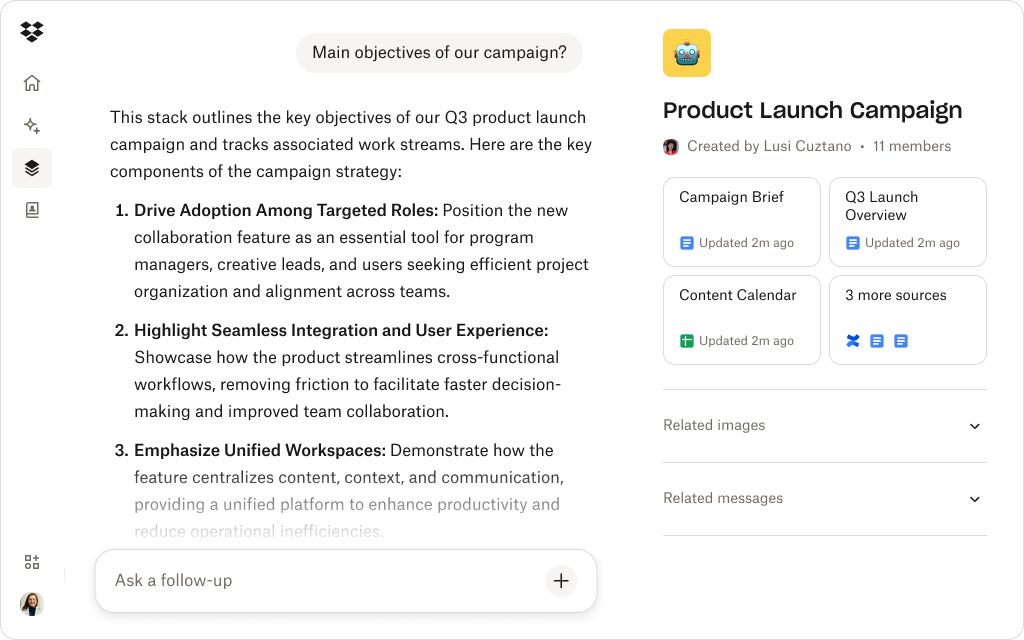
Dash transforms meetings into part of the creative workflow, linking insights directly to the assets, files, and deliverables that you’ve been talking about in the meeting.
Here’s how a few core Dash features bring much needed structure and clarity to meetings by keeping discussions, documents, and next steps in one system:
- Ask Dash about your meetings and get answers with context: Dash Chat can summarize a transcript—but it also understands your project. Ask Dash a question like, “What were the next steps from our campaign kickoff?” and it delivers a precise, context-rich recap drawn from your meeting notes, Slack threads, or relevant files.
- Find anything, from anywhere: Universal search in Dash pulls together everything you discussed and referenced in the meeting notes—from strategy documents in Dropbox to emails or decks shared across apps—so your team always works from the same playbook. Everyone stays aligned, no matter where the information originated.
- Keep every project in one view: Use Stacks to group meeting notes, creative assets, and deliverables in one view. Each Stack evolves with your campaign, keeping every decision, discussion, and document connected and searchable. It’s like building a living archive of your project’s progress as you go for easy reference later.
- Share securely, by design: Because Dash security is built on Dropbox architecture, permissions and folder structures stay intact. Teams can share recaps securely while keeping sensitive materials in the right hands. You gain greater collaboration without any increase in risk.
Think about the example of a campaign manager missing an approval deadline because notes lived in different threads. A simple oversight snowballs and then:
- Creative teams stall
- Launch dates slip
- The campaign’s momentum fades
When context is scattered, even the smallest disconnect can cost time—and opportunity. Connected tools like Dash ensure every decision, note, and next step stays visible.
With Dash, meetings start becoming part of your workflow. Every idea, takeaway, and decision stays visible, searchable, and actionable—so creative momentum doesn’t end when the meeting does.
Keeps every decision within reach
Dash Chat can summarize meeting notes, identify next steps, and link them to your campaign files—so teams can move from discussion to action faster.
Tips for keeping your meeting notes organized and useful
Every productive team knows that the real work begins after the meeting ends. Organizing meeting notes is about connecting the tools you already use. Here’s how teams can make it work:
- Keep everything in one place—store all meeting recaps, transcripts, and follow-ups in a shared Stack
- Link notes to assets—attach relevant campaign files, visuals, or decks directly to your meeting summaries
- Use AI for summarization, not substitution—let Dash Chat surface insights from your meeting notes, but always review and edit for nuance and accuracy
- Set ownership early—assign action items while the meeting’s fresh, then log them in Dash for accountability
- Review regularly—at the start of each project check-in, review prior notes in Dash to track progress and next steps
With connected documentation, meetings stop being checkpoints and start becoming engines of progress. Dash facilitates that—linking data into one intelligent workspace so teams can move from discussion to delivery
Move from conversation to collaboration with Dash
Collaboration shouldn’t end when the meeting does. Dash turns conversations into living documentation. With summaries, search, and Stacks that link every decision to its deliverable, Dash ensures nothing gets lost.
When your notes live where your work does, meetings don’t just happen—they move things forward. Dash unifies your workspace—so every meeting note becomes an action plan—try a demo or contact sales to find out more.
Frequently asked questions


.webp)