.svg)

.svg)

Want to turn scattered files into clear, organized workspaces? Stacks can help
We all want to deliver client work confidently. But, even with the most well-organized teams, client delivery can go sideways fast. Version links multiply, feedback arrives in different threads, file names start growing suffixes, and at some point, every client asks the same stressful question—“what’s the latest version?”
Cue panic, stage right. This doesn’t mean your team is disorganized, but it does show that traditional file sharing wasn’t built for modern delivery workflows. Clients want clarity, context, and confidence—all in one place, and without learning a new system. Stacks in Dropbox Dash offer exactly that—letting you group related content into one clear, client-ready view.
Stacks give teams a visual, secure way to group their important files into easy-to-understand, partner-ready collections—so work feels polished instead of patched together, and it’s super easy to share too.

Why does client delivery often feel more chaotic than it should?
By the time you’re ready to deliver work, the hard part should be over.
But for many teams, this is when things start to feel messy. Instead of a clean handoff, delivery turns into a maze of links, attachments, and clarification messages—making a strong project feel disorganized, right when it hits the client’s hands. Most of the chaos comes from how the work is shared. Common issues include:
- Multiple links being passed around for different versions
- Feedback scattered across email, Slack, and deliverable documents
- Clients saving (and possibly updating) outdated files to their own systems
- Difficulty knowing which asset is final
- No shared location where everything makes sense to all stakeholders
The result is a delivery process that feels more like troubleshooting than collaboration. Instead of focusing on the impact of the work, teams get pulled into unproductive link-chasing and frustrating version detective work.
When you move to a connected, clearly structured delivery flow, that final stage starts to feel the way it should—simple, confident, and aligned for launch.
The hidden friction behind scattered links and file versions
When files, feedback, or context are spread across different places, every small interaction becomes harder. Clients don’t know where to look, teams don’t know what’s current, and what should be smooth is messy and confusing.
Most teams suffer from a lack of structure in their cloud storage, not space. When assets, notes, revisions, and references all live separately, clients get lost. And when clients get lost, teams spend time:
- Re-explaining context
- Re-sending links
- Re-verifying versions
- Re-linking files that already exist
This friction tax slows reviews, delays sign-off, and makes even simple handoffs feel heavier than they need to be. When you replace scattered links with a connected workspace—every deliverable becomes easier to work with.
What teams need from secure file sharing and document management
Most marketing teams already have a place to store files. The challenge is turning that storage into a shared, dependable workspace where everyone sees the same thing—and understands what it means.
A modern delivery workflow has to support clarity, trust, and speed at once—especially when campaigns are complex. That means it needs more than a shared folder, your workflow needs things like:
- A single, clean place to share everything: No more buried folders or multi-tool confusion. One link, one view, so partners always know where to go for the latest work.
- Context attached to the work: Clients should understand why something exists—not just where the file lives. Notes, recaps, and usage guidance should live right alongside their associated assets.
- Confidence in permissions and access: Sensitive or pre-launch materials must stay visible only to approved stakeholders, even as links are shared and feedback flows between teams.
- A simple interface anyone can use: Clients shouldn’t have to learn new software to review work. The experience should always feel intuitive from the first click.
- A system that stays up-to-date automatically: Teams shouldn’t need to re-share links every time something changes, the primary link in any sharing or management tool should always point to the most current version.
Dash Stacks deliver all five in one lightweight, intuitive workspace. They give teams a central, permission-aware hub where files, context, and collaboration come together—so delivery feels organized and easy to navigate.
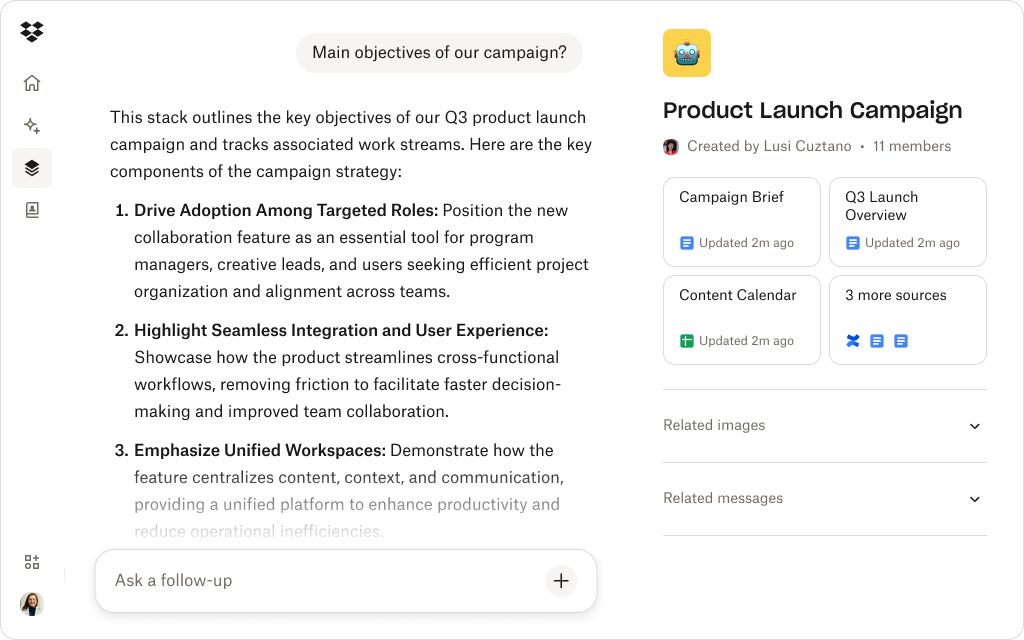
How Dropbox Dash Stacks turn messy handoffs into clean workspaces
Stacks fill the organizational gap between where files live and how clients understand them. It’s a simple way to keep partners up-to-date with a click. Here are a few ways they make work easier:
Organize assets visually
Stacks display files in a structured, easy-to-scan layout—ideal for client reviews, multi-file deliveries, or campaign wrap-ups, so no one has to dig through folders to understand the full picture.
Consider a brand agency delivering a rebrand package with logos, color palettes, typography guidelines, launch decks, or social templates. Instead of sending a messy folder tree, they share a Stack that groups everything. The client can scroll once, see what’s included at a glance, and immediately understand how the pieces fit together.
Share one link—not multiple
Instead of sending separate links for decks, images, and documentation, teams share one secure Stack link that contains everything—making it clear that this is the source of truth for the project.
Think about this example. A performance marketing team wraps a campaign and sends a single Stack link to their partners. Inside are the final report, raw dashboard exports, creative assets, and the recap deck. The partners send one link to their leadership team, knowing everyone will see the same files, versions, and campaign story.
Provide clarity with context blocks
Add descriptions, notes, or instructions to your Stack labels so clients always know what they’re looking at and why it matters—turning an intimidating pile of files into a guided walkthrough they can’t wait to get through.
Let’s say an in-house creative team shares a Stack for a product launch. Above the assets, they add short context labels like “Start here: Overview deck”, “Use these images for social only”, or “This group contains print-ready files”. When the sales team opens the Stack, they know exactly which files to use for which channel and can get to work.
Stay aligned with secure file management
Stacks inherit existing Dropbox file permissions automatically, keeping sensitive work controlled and compliant while still feeling effortless to access for the right people. Dash is built on the trusted Dropbox security foundation, so the same permission model that protects your files also governs how they appear in Stacks.
Imagine a healthcare marketing team collaborating with external partners on patient-facing materials. The Stack they share only includes assets that those partners are allowed to see, because it’s built on existing permissions. The external team gets all they need in one place, while internal drafts and regulated content stay out of view.
Give clients more insight with Dash Chat
Your team can use Dash Chat to turn long content into clear summaries and callouts—then surface those in the Stack itself. That means clients get the “why it matters” without needing a walkthrough every time.
For example, a B2B account lead sharing a Stack full of technical whitepapers and a QBR deck might ask Dash Chat, “What are the top three recommendations from this review?” They can then paste that recap into the Stack description or a short context block. When the client opens the link, they see the full materials and an easy-to-scan summary—no extra emails required.
Stacks turn delivery into an experience that feels intentional. Alongside many other AI-powered features in Dash, they give teams a more secure way to increase efficiency and work better with their data.
Help teams deliver work with clarity and control
Stacks in Dash let you group your files into clean, shareable workspaces—one link, one view, and zero confusion.
Practical ways agencies and teams can use Stacks for smoother delivery
Great work doesn’t feel finished until it’s shared. The final stretch is where confusion often creeps in. Stacks give agencies and in-house teams a simple way to turn that chaos into a calm experience, so delivery feels polished:
Here are a few practical ways agencies and teams can use Stacks for smoother delivery:
- Client-ready review spaces—present concepts, revisions, and final assets in a structured order so clients can review without digging
- Campaign handoff packages—bundle creative files, messaging docs, instructions, and timelines in one place for seamless multi-channel asset transfers
- Partner or vendor collaboration—give external partners a curated workspace without exposing your entire drive or folder structure
- Onboarding and knowledge transfers—use Stacks as briefing hubs that contain background documents, past work, and other relevant assets
- Final delivery portals—share final files, usage guidelines, and licensing documents together, instead of sending separate messages
Stacks scale with the work—whether it’s a single deliverable or a full campaign rollout. By turning folders into clean, contextual workspaces, Dash Stacks help teams deliver with more confidence on both sides of the table.
Deliver clearer work that feels polished with Dropbox Dash
Clients remember how your work felt to collaborate on. Chaotic file sharing can make even great creatives feel disorganized. Dash Stacks help teams deliver the opposite—an experience where clients always know what’s what.
When your delivery workflow feels as polished as your output, trust grows—and projects move faster. Stacks turn scattered assets into organized workspaces—so every delivery feels seamless. Try a demo or contact sales today.