
.svg)

.svg)

Collaborate with AI confidently—without losing consistency, clarity, or control.
AI is now part of everyday work—from drafting messages to reshaping presentations to summarizing long documents. But when every person or team uses AI in their own way, the result isn’t efficiency—it’s inconsistency.
Different tones. Different formats. Different interpretations of the same message. Soon, no one’s sure which version is right or if the AI even used the correct source material. To collaborate with AI effectively, teams need more than clever prompts. They need structure: a shared way to collect drafts, store context, and define what “good” looks like.
Dropbox Dash brings that structure to life. With Stacks, marketing and creative teams can centralize references, drafts, feedback, and AI-assisted work so collaboration stays consistent and aligned, even as AI becomes part of every workflow.
.jpg)
Why teams struggle to collaborate when everyone uses AI differently
AI is flexible. Teams are not always aligned.
Without shared guidelines or a shared workspace, collaboration breaks down:
- People rely on different sources when prompting
- AI outputs vary wildly in tone and quality
- Version confusion increases as drafts multiply
- No one knows which AI-generated pieces are “approved”
- Teams question the accuracy or authority of the content
Instead of unifying work, AI becomes another layer of fragmentation.
What AI introduces into cross-functional workflows
AI speeds up everything, from ideation to analysis, but it can also amplify inconsistencies if teams aren’t coordinated. AI affects:
- Content creation: Messaging, explanations, and outlines
- Summarization: Meeting recaps, campaign insights, and briefs
- Transformation: Converting long docs into one-pagers or slides
- Analysis: Spotting themes or patterns in multiple files
Without aligned workflows, the output becomes unpredictable and difficult to trust.
The risks of uncoordinated AI use across teams
When AI tools are adopted in silos, small misalignments compound into big collaboration problems:
- Mismatching tones that confuse clients or stakeholders
- Outdated references because people prompt AI with old files
- Lost rationale behind why decisions were made
- Overwrites and conflicting versions
- Unclear ownership of AI-generated materials
AI should simplify teamwork, not create chaos. The key is giving teams a shared structure that keeps every version, prompt, and decision connected.
What controlled, collaborative AI actually looks like
AI becomes a true team tool when everyone operates from the same foundation:
- Shared source materials—every brief, deck, and guideline feeds the same AI system.
- Centralized workspaces—drafts, references, and feedback live together, not scattered across apps.
- Clear expectations—agreed-upon tone, quality standards, and approval checkpoints keep outputs consistent.
- Transparent iteration—teams can see how ideas evolve—from first draft to final version.
- Secure foundations—AI never accesses more than what a user is permitted to view.
Dropbox Dash was built around this principle.
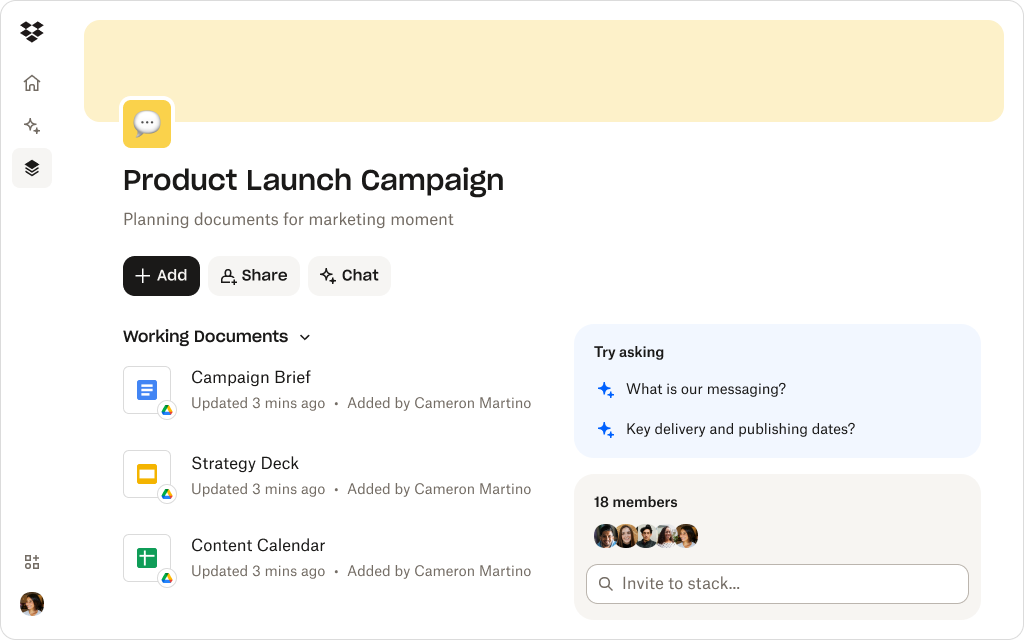
How Dropbox Dash helps teams align AI work with shared Stacks
Stacks transform AI from a personal productivity tool into a connected, team-aligned system.
Group everything into one shared workspace
Bring briefs, brand guidelines, reference docs, drafts, recordings, and performance files together in one Stack. Every AI prompt can pull from the same approved foundation.
Make AI-generated work visible—not siloed
Add AI drafts directly to the Stack so everyone can see how ideas evolve and which direction has been approved.
Keep context attached to content
Notes, rationale, and creative direction live right beside the files, not lost in chat threads or email chains.
Use Dash Chat to align understanding
Dash Chat can summarize documents, clarify past decisions, and explain complex materials so teams stay on the same page before generating new content.
Dropbox’s secure foundation prevents overexposure
Stacks inherit Dropbox permissions automatically—so client data and sensitive campaign work stay protected.
Dash helps teams stay fast without losing alignment, accuracy, or oversight.
See how Stacks keep teams organized, consistent, and confident
Stacks create shared spaces where AI drafts, references, and feedback stay connected—so teams collaborate with clarity, not chaos.
Practical ways to bring structure to AI collaboration
Even the most advanced AI can’t create alignment on its own, that comes from the way teams use it. Building a shared framework doesn’t have to be complicated; it just requires consistency, visibility, and a clear home for every piece of work. Here’s how to bring that structure to life with Dropbox Dash:
1. Centralize your reference materials
Store briefs, messaging docs, and guidelines in one Stack so AI prompts always draw from trusted sources.
2. Track iterations in the same workspace
Keep every draft and version visible for transparency and context.
3. Use Dash Chat to clarify inputs before generating
Ask Dash to explain documents or summarize context so your prompts are more accurate.
4. Create a shared “AI usage” playbook
Even simple guidelines—tone, length, preferred formats—keep outputs consistent.
5. Review AI work as a team
Use the Stack as the feedback hub so everyone sees decisions, comments, and rationale.
When collaboration happens inside a connected workspace, alignment becomes effortless. With Dropbox Dash, every prompt, draft, and decision stays grounded in the same trusted foundation—so teams can move fast without losing control.
AI that supports teamwork—not chaos
AI is most powerful when it strengthens collaboration, not when it fragments it. True AI teamwork requires consistency, shared context, and a single source of truth, all things traditional file sharing can’t provide alone.
Dropbox Dash delivers that foundation. Stacks keep everything aligned, Chat brings clarity to every conversation, and Dropbox’s secure framework protects what matters most.
When AI becomes a connected part of your workflow—not a disconnected shortcut—your team moves faster, stays aligned, and produces work that’s consistently on-brand and on point.
Keep AI collaborative—and controlled—with Dropbox Dash
Dash helps teams use AI confidently by connecting drafts, files, and context into shared Stacks—so collaboration stays aligned, secure, and easy to follow. Try a demo or contact sales to get started.
Frequently asked questions



.webp)