
.svg)

.svg)

Build an AI toolkit that actually works—fuelling focus and creativity.
Artificial intelligence has moved from a buzzword to a daily reality. Whether you’re a freelancer, marketer, or creative professional, AI can help you write faster, brainstorm ideas, summarize research, or organize projects—but only if the tools you choose work together.
That’s where most people get stuck. There’s no shortage of AI tools, but stitching them into a workflow that saves time (instead of adding complexity) takes planning.
Dropbox Dash makes that process simple. Acting as the hub of your personal AI toolkit, Dash connects all your existing tools, files, and workflows—so every idea, draft, or document is easy to find, use, and improve.

Why everyone needs a personal AI toolkit for work
Work is evolving—and the real challenge is staying focused. Between constant notifications and competing tools, it’s easy to lose sight of what actually moves projects forward. That’s where a personal AI toolkit comes in.
An AI toolkit is about connecting the right tools in a way that supports how you think, create, and get things done. A personal AI toolkit helps you:
- Cut through distracting noise—so your tools work together, not against you
- Focus on work that really matters—not just hunting for files or scouring emails
- Get to great ideas faster—so you can move forward with purpose
Instead of bouncing between tools, Dash brings connected apps, files, conversations, and insights together—so every tool you use works in sync with how you actually work. During a typical workday, this means you can:
- Work faster—automate repetitive tasks like summarizing meetings or sorting files
- Stay organized—keep creative ideas, briefs, and drafts in one connected system
- Stay creative—use AI for ideation and iteration, not just generic output
- Maintain accuracy—ground your AI tools in real data and brand context
A toolkit can turn AI from a novelty into a dependable part of your daily process. AI-powered features in Dash do that by keeping tools, content, and ideas connected, so you can spend less time managing and more time doing.
The benefits of curating your own mix of AI tools
In a world of constant new tools, it’s easy to mistake volume for progress. More apps don’t mean more impact—especially when they pull focus. Building an AI toolkit involves designing a workflow that amplifies your strengths.
The best setups feel invisible. Every tool works together to help you think faster, create better, and stay aligned with your goals. A well-curated AI toolkit helps you:
- Reduce app fatigue—fewer logins, fewer browser tabs, more focus
- Avoid redundancy—why pay for multiple tools that do the same thing?
- Build muscle memory—when tools are consistent, you spend less time switching gears
- Scale your process—once your toolkit works, you can replicate it for clients or collaborators
Dash ties it all together, ensuring every AI tool complements the others. By connecting search, content, and context across your toolkit, Dash helps your workflow stay simple—so you can spend less time configuring the technology.
Additionally, because Dash is built on the Dropbox trusted security framework, your data and ideas stay protected as you build your AI toolkit.
Common mistakes people make when building an AI toolkit
Building an AI toolkit should make work simpler—but it’s easy to go from streamlined to scattered. The pressure to try to keep up with the latest tools can lead to chaos, and AI only makes your workflow smarter if it’s built on clarity.
Without that foundation, even the most advanced tools start working against you—and experienced professionals run into trouble when setting up their AI systems. The most common pitfalls include:
- Tool overload: Trying every new AI platform creates more complexity than clarity. More apps often mean more confusion, not more creativity.
- Lack of structure: Tools work best when supported by an organized content foundation, like Dropbox cloud storage. AI can’t fix chaos, it can only learn from the direction you give it.
- No central hub: Without a unifying workspace, AI insights and assets remain scattered across apps. Disconnected systems mean great ideas can fall through the cracks.
- Overreliance on automation: AI can enhance your work—but it shouldn’t replace critical thinking or brand judgment. Human insight turns AI enhancements into a clear path forward.
To avoid these mistakes, build your toolkit around a connected workspace that brings your tools and files together. Dash acts as an AI command center—linking tools into one organized ecosystem, for fewer tools and more flow.
The core categories of tools every professional should consider
The most effective professionals don’t chase new tools—they build systems around what truly supports how they think, collaborate, or create. Whatever your role, a well-balanced AI toolkit gives you leverage to work better.
A strong AI toolkit helps teams stay organized and make smarter decisions without losing the human insight that drives great work. This covers four core needs—creation, organization, communication, and insight:
- Creation tools: AI writing and design tools like Dash Chat (or tools that don’t use the context of your connected data—like Notion AI, Jasper, or Adobe Firefly) can help generate first drafts or visuals. Dash Chat turns blank page syndrome into starting points grounded in your brand, freeing you to focus on refinement and originality.
- Organization tools: Dash anchors your toolkit by connecting apps, documents, folders, and assets across tools, so you can use universal search to find, Dash Chat to summarize, and Stacks to manage files in one place. It’s the foundation that keeps creativity structured and searchable.
- Communication tools: Apps like Slack and Zoom now include built-in AI features that summarize meetings and threads. With Dash, those insights stay connected to your larger workspace, and you can use Dash Chat to summarize those insights—so they don’t get lost, but stay connected to your larger workspace and projects.
- Insight and analytics tools: Tools like HubSpot or Google Analytics turn campaign data into recommendations. Dash Chat can easily summarize those reports into more digestible chunks or connect them directly to related campaign files in search, which gives teams faster, data-driven action through AI.
Dash complements these tools, becoming the connective tissue that makes the entire system smarter and more sustainable. Build a toolkit that feels less like a collection of apps—and more like an extension of how you work.
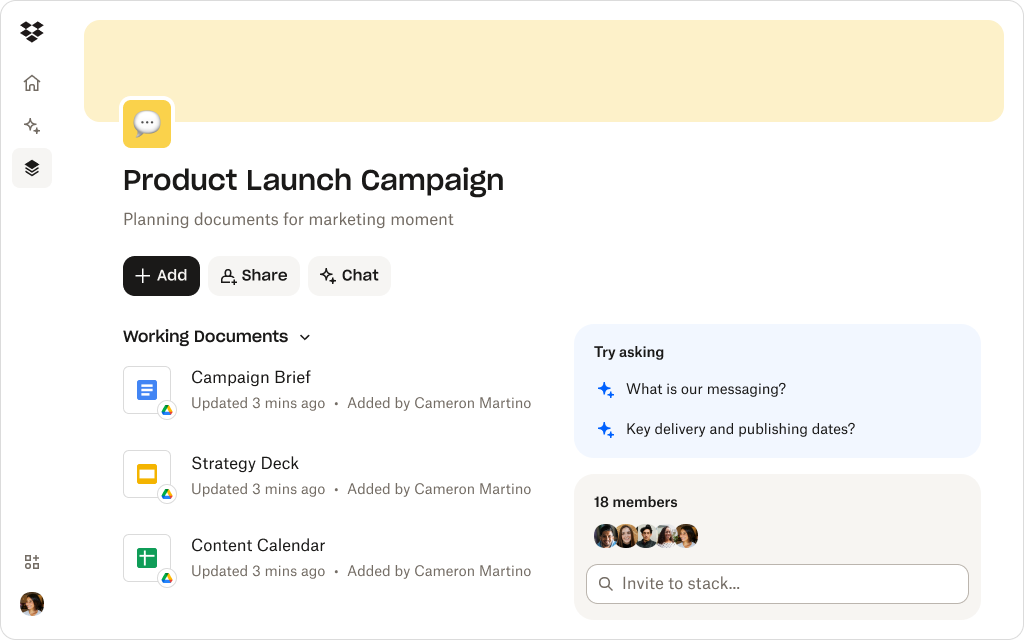
How Dropbox Dash anchors your personal AI toolkit
Here’s how Dash helps your AI toolkit work smarter, not harder:
Universal search for everything you use
AI-powered universal search in Dash can search Dropbox, Google Drive, Slack, and other important surface areas, so you can find notes, documents, or creative assets fast—even if you can’t remember where they live.
For example, a marketing lead can instantly surface last quarter’s performance deck, campaign assets, and relevant feedback threads across tools in seconds—no more asking teammates or sifting through endless emails.
Dash Chat for creative and analytical support
Ask Dash Chat to summarize campaign results, extract insights from research, or refine a brief—all grounded in your actual files. As Dash works from your connected content, its responses are accurate, contextual, and on-brand.
A content strategist can ask Dash Chat, “Summarize the top learnings from our latest campaign results and rewrite the brief for our next launch”, and receive a fast, contextually relevant draft that reflects the team’s tone and goals.
Stacks for personal organization
Stacks are visual, shareable collections for projects or clients. You can group notes, assets, or drafts into one view, then use Dash Chat to ask questions in that Stack—like “What were the takeaways from our latest client notes?”
Imagine a designer prepping for a pitch, they can open a Stack with brand guidelines, mockups, and meeting notes—and in moments, Dash Chat can find client needs or feedback, helping them tweak their ideas with confidence.
AI built on Dropbox security
Because Dash is built on Dropbox, your toolkit starts with a trusted cloud storage and sharing foundation. You can layer additional tools on top without losing control of your files. There’s an admin console to maintain oversight too.
For example, a creative agency using external AI tools for ideation can securely connect them to Dash, knowing all data stays protected under enterprise-grade security—so they can innovate without risking confidentiality.
These AI-powered features and capabilities mean Dash becomes the intelligent layer over your digital workspace.
Create, summarize, and ideate easily
Dash Chat securely connects all your existing data to generate on-brand copy, ideas, and insightful summaries based on the context and goals of your organization.
Tips for maintaining and evolving your AI toolkit over time
The best AI toolkit is one that evolves with you. As projects change and new technologies emerge, your workflow should be flexible enough to adapt while keeping your creative foundation steady.
Treat your toolkit as a living system—one that learns from your habits, optimizes repetitive tasks, and grows as you use it. An AI toolkit isn’t static—it grows as your work evolves. Keep it sustainable with these habits:
- Review your tools quarterly—remove what you don’t use and upgrade what adds real value
- Standardize your workflow—store all AI outputs (summaries, drafts, designs) in connected folders or Stacks
- Prioritize secure tools—choose platforms that protect your data and don’t train external models, such as Dash
- Use AI for repetitive tasks—let AI handle the repetitive tasks so you can focus on strategy and creativity
- Document your setup—record the tools you use and why in Dash, so they’ll be easier to replicate or scale later
A well-maintained toolkit grows stronger over time, helping you stay adaptable and efficient as new tools emerge. Dash gives you the power to keep growth seamless—connecting your data so your toolkit stays ahead of the curve.
Create a sustainable, connected AI toolkit with Dash
The future of work won’t be defined by how many tools you use—but how well they work together. The tools don’t define your creativity—how you use them does. Dash just helps everything click into place.
By turning your workspace into an AI-powered hub for search, summarization, and organization, Dash helps you stay in control. See how Dash works for yourself—try a demo or contact sales to get started.

