
.svg)

.svg)

AI is powerful—but knowing when to trust it is the real competitive advantage.
AI is becoming a constant presence in modern work—drafting emails, summarizing long reports, and reshaping presentations in seconds. But one question keeps teams from moving faster: When should we trust AI and when should we step in?
Some teams lean too hard on automation, publishing AI-generated content without review. Others avoid it altogether, worried it might introduce errors or lose nuance. Both approaches slow progress and miss the point.
The real advantage lies in balance—understanding where AI excels, where it falls short, and how to design workflows that combine human judgment with AI speed.
That’s where Dropbox Dash comes in. AI responses in Dash Chat are powered by your team’s own files not random data from the open web. Every summary and suggestion links directly back to its original source in Dropbox or other connected apps, so teams can validate insights, maintain quality, and keep momentum without sacrificing trust.

Why teams struggle to know when AI is “right enough”
AI can feel unpredictable. One moment it surfaces a brilliant insight; the next, it confidently misses the mark. The issue isn’t capability—it’s clarity.
Teams often hesitate because they:
- Don’t know what information AI is drawing from
- Can’t tell whether an output is complete or partially flawed
- See inconsistent results across tools or prompts
- Lack a clear review process for AI-assisted work
- Don’t want to rely on something they can’t verify
Trust doesn’t come from the output—it comes from the visibility into how the output was created. When teams can see how an output was created and where it came from, AI becomes less of a gamble and more of a partner.
Where AI excels in marketing and creative workflows
Used intentionally, AI can free up marketers and creatives to focus on higher-value thinking. Its strength lies in the repetitive, time-intensive parts of the process that still require accuracy and context. Some example tasks include:
- Summarizing content: AI quickly condenses long docs, meeting notes, and decks into digestible takeaways.
- Drafting first versions: Whether it’s messaging, briefs, outlines, or one-pagers, AI helps teams move past the blank page.
- Transforming content: Need to adapt a message for a different audience or channel? AI can rewrite, shorten, or reformat content in seconds.
- Searching across large knowledge sets: When grounded in real content, AI finds themes and relevant files faster than manual search.
- Spotting patterns: AI helps teams analyze past campaigns or creative assets to identify insights worth repeating or avoiding.
In these use cases, AI becomes a productivity multiplier, helping teams move faster without sacrificing depth or creativity.
Where human oversight still matters
Even the strongest AI systems benefit from human review—especially in marketing and creative work where tone, accuracy, and brand trust are everything.
- Brand nuance—only people truly understand the emotional and strategic impact behind a brand’s voice.
- High-stakes content—executive messaging, legal or compliance-related materials, and pricing updates always deserve human review.
- Audience judgment—AI can’t read the room. It can’t anticipate how an audience will feel or react to your content.
- Prioritization and decision-making—AI provides information; humans decide what matters most.
- Verification of facts—AI needs grounding. Teams must confirm that every claim aligns with actual data or approved source files.
AI accelerates creation but human oversight ensures it’s accurate, on-brand, and strategically sound. Together, they make teams not just faster, but smarter.
How to combine AI speed with human judgment
The most effective teams don’t see AI as a shortcut—they see it as a collaborator. When people and AI work side by side, teams move faster and make smarter choices.
Here’s what that balance looks like in practice:
AI handles:
- Drafting first versions of content and campaigns
- Summarizing large volumes of information quickly
- Translating complex materials into simpler formats
- Generating options, variations, or creative directions
Humans handle:
- Editing for tone, brand quality, and nuance
- Fact-checking and validating data
- Making final decisions and approvals
- Managing sensitive or high-impact messaging
AI expands possibilities. Humans decide what’s right. Together, they turn automation into strategy.
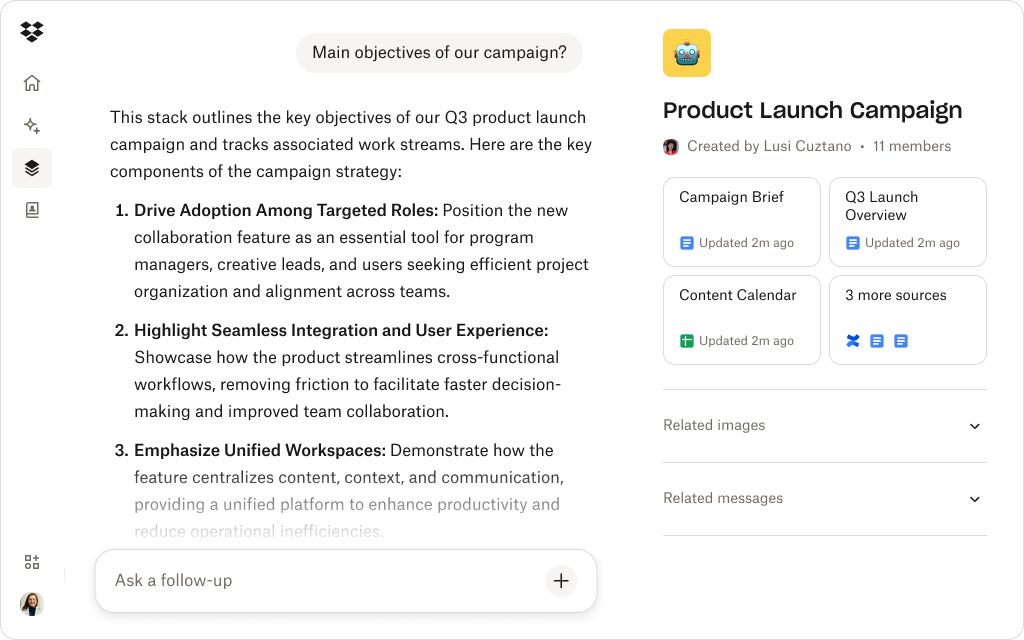
How Dropbox Dash makes AI more trustworthy for teams
The biggest barrier to trusting AI is uncertainty, where the information came from, how it was generated, and whether it can be verified. Dropbox Dash removes that doubt by grounding every AI response in your organization’s real content, not external data sources.
- Your files are the truth source: Dash Chat answers based on your Dropbox-stored materials: briefs, decks, reports, messaging docs, campaign assets, and more.
- Every answer links back to a file: Dash never leaves you guessing. Each summary or suggestion includes a direct link to the original source, keeping AI transparent and verifiable.
- Permissions stay intact: AI cannot surface or summarize files users aren’t allowed to access. Control stays with your team, exactly where it belongs.
- Stacks create shared alignment: Teams can store AI drafts, human revisions, reference docs, and feedback together in one Stack—so everyone works from the same source of truth.
- AI becomes explainable, not mysterious: With Dash, teams can see both the answer and the path back to the content behind it. That’s what makes AI output trustworthy, auditable, and actionable.
See how Dash Chat keeps AI grounded in your real content
Dash provides clear, source-linked answers based on your Dropbox files—so teams can trust AI without losing control.
Practical ways teams can stay accurate while working with AI
A little structure goes a long way in keeping AI output reliable and brand-safe. Here’s how teams can keep quality high while moving quickly:
1. Ask AI to show its reference points—Dash lets you view summaries alongside the original file for quick verification.
2. Use Stacks as shared AI workspaces—store every draft, comment, and approved version in one place to eliminate version drift.
3. Treat AI output like a draft, not a decision—fast first versions save time—but human refinement ensures quality, clarity and credibility.
4. Establish internal “AI guardrails”—simple guidelines around tone, terminology, and sensitive topics help AI stay consistent and compliant.
5. Use AI to compare versions or highlight gaps—Dash can pinpoint changes or missing details across long documents to keep projects accurate and aligned.
Good teams use AI for acceleration, great teams use it for alignment. Dash gives you the structure to do both.
The future: AI as a partner, not a decider
AI’s role in marketing and creative work will only keep growing. The teams that thrive won’t be the ones who automate everything, they’ll be the ones who know when to trust AI, when to question it, and how to bring both together in one shared workflow.
Dropbox Dash makes that partnership possible. By combining secure file storage, transparent AI insights, and collaborative workspaces, Dash helps teams move faster without losing accuracy or control.
Trust AI with speed. Trust your team with the decisions. Let Dash connect the two.
Use AI confidently with Dropbox Dash
Dash makes AI safer, clearer, and more collaborative—grounding every insight in real, reviewable content. Try a demo or contact sales.


